
Automated BoQ generation can turn drawings and specs into a structured, exportable Bill of Quantities within minutes rather than days. It reliably outputs line items, units, quantities, and confidence scores in Excel or PDF format. The caveat that matters most: a qualified estimator still has to check every flagged item and verify scale calibration before that BoQ goes anywhere near a bid.
TL;DR:
- Automated BoQ generation saves time by producing structured, exportable quantities within minutes, but still requires manual verification of flagged items.
- Scale calibration and recognition accuracy are the main sources of errors, emphasizing the importance of thorough review and audit logging.
- The daily benefit lies in improved repeatability, reduced errors, and better traceability, allowing estimators to focus on pricing and risk assessment.
- Proper workflow integration involves reviewing low-confidence items and maintaining disciplined overrides, not relying solely on automation.
- Using automation on low-risk projects first helps identify failure modes and build confidence before applying it to sensitive or high-value tenders.
Table of Contents
- What is a Bill of Quantities, and why does accuracy matter?
- How does automated BoQ generation actually work?
- What benefits does automated BoQ generation deliver day to day?
- How do you implement automated BoQ generation without losing control?
- Where does automated extraction go wrong, and how do you mitigate it?
- How does Quantiflow apply this in practice?
- An estimator's honest take on automation
- Automate your BoQ workflow without losing the sign-off
- Sources
What is a Bill of Quantities, and why does accuracy matter?
A Bill of Quantities lists every measurable item in a construction project: descriptions, units, quantities, and often unit rates, organised so contractors can price consistently against the same scope. It is the document that turns a set of drawings into something you can actually tender against.
Get the BoQ wrong and the consequences ripple through the whole contract. Tender evaluation depends on comparing like-for-like pricing across bidders, so an inconsistent or incomplete BoQ produces bids that cannot be fairly compared. Once a contract is signed, the BoQ becomes the reference point for how construction contracts use BoQ to manage valuations, variations, and disputes over what was and wasn't included.
Most UK practices structure their BoQs around NRM2, while international teams sometimes map to CSI MasterFormat conventions. Automation tools that understand these structures save the reformatting step that used to eat up an estimator's afternoon:
- Standardised item descriptions and units across every trade section
- Quantities linked back to the drawing sheet they came from
- A consistent taxonomy that matches your existing pricing library
How does automated BoQ generation actually work?
The process runs in a fairly fixed sequence, whether you're processing a single-storey extension or a multi-block residential scheme. Understanding the pipeline helps you spot where errors creep in.
- Format detection. The system checks whether it has received a native PDF, a scanned image, or CAD/BIM data (DWG, DXF, Revit, IFC). Scanned drawings need more processing and carry higher risk of misread symbols.
- Scale calibration. Every sheet gets a scale reference, either from title block data or a known dimension, before any measurement happens. This step is the single biggest source of downstream error if it's skipped or misread.
- Symbol and element recognition. The engine identifies walls, doors, windows, fittings, and other tagged elements across the drawing set.
- Quantity computation and cross-reference. Measured quantities get matched against specification documents and schedules to confirm what's actually being priced.
- Output generation. Line items appear with source links back to the originating sheet, a confidence score per item, and flags on anything the system couldn't resolve cleanly.
Reliable pipelines don't just calculate a number. They log the scale calibration per sheet and carry that confidence score through to every linear and area quantity derived from it, according to RenderDraw's documentation on automated takeoff workflows. Without that provenance, a reviewer has no way to know which items to trust and ends up re-checking the entire BoQ instead of the handful of items actually flagged.
Statistic callout: Engineering consultancies report measurable time savings and error reduction when structured extraction is paired with formal review, according to Cundall's commentary on automating BoQ creation. The saving comes from the review being targeted, not from skipping it.
Exports typically land as Excel, CSV, or a templated BoQ matched to your existing format, which is where multi-format ingest tools have made real progress. Products handling mixed inputs, including scanned BoQs alongside native PDFs, can map results straight into a consistent output template rather than forcing manual reformatting, per Bidyou.
What benefits does automated BoQ generation deliver day to day?
The time saving is real, but it's not the interesting part. What matters more is where that saved time goes.
- Speed. Extraction that took a junior estimator two days now runs in under an hour for a comparable drawing set.
- Repeatability. The same taxonomy and formatting apply every time, so BoQs from different projects are actually comparable.
- Reduced transcription error. Quantities pulled directly from drawings skip the manual counting and typing that introduces mistakes.
- Traceability. Every line item links back to its source, which speeds up internal review and external audit alike.
Use cases stretch across the project lifecycle: tender BoQs at the bid stage, preliminary cost plans during feasibility, procurement schedules once a contractor is appointed, and progress billing during construction where quantities need re-verifying against variations.
The real shift is in where estimator time goes. Instead of spending the bulk of a working week on data entry, estimators spend it on pricing strategy, risk assessment, and querying the items the system couldn't resolve confidently.
Pro Tip: Run your first automated BoQ on a low-value, well-documented tender before you trust it on anything commercially sensitive. You'll learn your tool's failure patterns on a project where a mistake costs you an afternoon, not a contract.
How do you implement automated BoQ generation without losing control?
Automation only earns its keep when it sits inside a workflow that keeps a professional in the loop at the points that matter. That workflow looks broadly like this:
- Prepare and name files consistently, checking each drawing has a legible title block and scale reference before upload.
- Run extraction and let the system generate line items, quantities, and confidence scores.
- Review low-confidence flags first, working trade by trade rather than top to bottom.
- Issue RFIs where a specification gap or ambiguous symbol can't be resolved from the drawing alone.
- Export and apply rates, pulling from your live pricing library or rate book.
- Run a final spot check against the drawing set and log the result in an audit trail.
A few operational habits make this workflow hold up under pressure:
- Set a confidence threshold below which items get mandatory human review, not optional review.
- Assign review responsibility by trade so the person checking M&E quantities actually knows M&E.
- Capture the reason behind every manual override; feeding those corrections back steadily improves extraction accuracy on your typical project types.
- Version every export and keep a revision log so you can show exactly what changed between tender stages.
This is where the value of automation compounds. As IBM notes in its work on AI and automation, these systems work best as human-in-the-loop tools that remove repetitive structuring and let professionals concentrate on validation and pricing decisions, not as a replacement for the professional making the call. Building that governance into your process from day one, rather than bolting it on later, is what separates a tool that saves time from one that creates liability. For firms weighing where AI-assisted judgement fits into QS practice more broadly, Quantiflow's piece on professional judgement and AI is worth a read alongside this.
Where does automated extraction go wrong, and how do you mitigate it?
Every automation failure traces back to one of a small number of causes, and most are preventable if you know to look for them.
Common failure modes:
- Incorrect scale detection, usually from a missing or misread title block dimension
- Ambiguous or firm-specific symbols the recognition engine hasn't been trained on
- Poorly scanned or low-resolution documents that blur line weights and text
- Missing specification cross-references, so a quantity exists without confirmation of what it actually specifies
Practitioners consistently point to unchecked scale calibration and ignored scope-gap flags as the two mistakes that cause the most tender risk when teams adopt these tools without proper review discipline. The mitigation is straightforward in principle, harder in practice: confidence scoring on every line item, a manual spot check before export, pre-upload quality checks on scan resolution, and disciplined RFI drafting the moment a gap surfaces. Keep an audit log of every override and flag resolution, because that log is what protects you if a quantity is challenged later.
The uncomfortable truth is that automation can reveal scope gaps just as easily as it can hide them. A tool that flags an ambiguous item is doing its job. A team that stops reading the flags because the export looked clean is the actual risk, not the software.
How does Quantiflow apply this in practice?
Quantiflow builds NRM2-aligned takeoffs from architectural drawings while keeping the quantity surveyor's professional judgement at the centre of the process, not on the sidelines. Every extracted quantity carries a confidence score and a source link back to the drawing sheet it came from, so reviewers know exactly where to spend their attention.

Dense PDF drawing sets get turned into structured, priceable BoQ output with a live UK rate library attached, meaning the output isn't just measured, it's ready to price. Multi-role collaboration and revision logging mean a takeoff produced by one estimator can be checked, amended, and signed off by another with a full audit trail intact, which matters as much for internal quality control as it does for client-facing accountability. The platform's own guidance on selecting AI estimating tools covers what to look for when evaluating any provider against your own workflow, not just Quantiflow's.
An estimator's honest take on automation
Treat this technology as an efficiency layer, not a replacement for judgement, and it will earn its place in your process quickly. Pilot it on a low-risk tender first. Watch where it flags uncertainty, because those flags are the actual product; the clean line items were never the hard part of estimating.
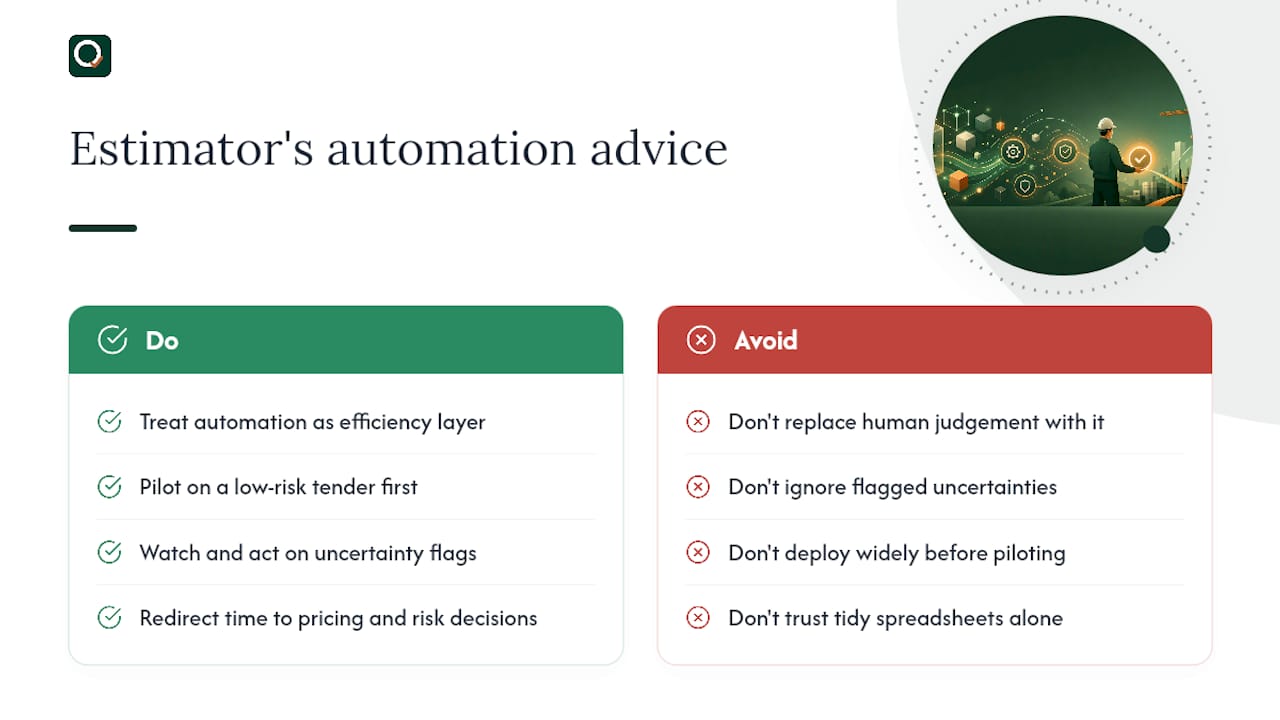
What automation actually buys you is time redirected toward the decisions that carry commercial weight: pricing strategy, risk allocation, and querying the ambiguous scope before it becomes a dispute. A firm running this well should find its senior estimators spending noticeably less time on data entry and noticeably more time on the judgement calls that justify their day rate.
The tools that win long term will be the ones that make their uncertainty visible rather than the ones that produce the tidiest-looking spreadsheet.
— Michael
Automate your BoQ workflow without losing the sign-off
Quantiflow gives quantity surveyors and small practices a faster route to a priceable BoQ than manual takeoff, without handing away the professional sign-off that a tender actually needs. It ingests dense PDF drawings, cross-references them against specs, and produces NRM2-aligned quantities with confidence scoring and source links built in, so your review time goes to the items that actually need it.
Plans run from Solo at £39 a month for individual estimators through to Business at £149 a month for firms needing multi-role collaboration and audit logging, with custom Enterprise terms for larger practices. If you're currently rebuilding BoQs by hand for every tender, Quantiflow's platform is worth trialling on your next low-risk job. Start with a trial project, check how the confidence scores match your own judgement, and decide from there whether it earns a permanent place in your workflow.