
For UK quantity surveyors, Quantiflow is the recommended AI estimating tool for NRM2-aligned takeoffs and BoQ generation, with STACK, Togal.AI, Kreo, ConstructConnect, and Hover rounding out the shortlist for different team sizes and workflows. This comparison, reviewed by Michael, draws on the 10 Best AI Estimating Software Reviewed in 2026 roundup alongside direct evaluation of trial accounts, published documentation, and UK-specific feature sets.
Quick shortlist for UK practice:
- Quantiflow — Best for SME QS teams needing NRM2-aligned takeoffs, a live UK rate library, and auditable BoQ exports
- STACK — Best for estimators who need fast cloud-based takeoff with a broad trade library
- ConstructConnect — Best for large contractors managing multi-trade bid packages and subcontractor workflows
- Togal.AI — Best for rapid AI-powered area and quantity extraction from PDF drawings
- Kreo — Best for BIM-connected teams wanting 3D model-driven quantity takeoffs
- Hover — Best for refurbishment and home-improvement workflows needing photogrammetric 3D measurement
- eTakeoff — Best for estimators who prefer a desktop-first, drawing-markup takeoff environment
- Handoff — Best for small builders wanting integrated takeoff, proposal, and invoicing in one tool
- Beam AI — Best for teams exploring LLM-assisted bid narrative and specification generation
- WorkPack — Best for field-to-office teams needing mobile capture alongside cost tracking
monday.com and monday AI Workspace are included in the comparison as project and workflow management platforms that some estimating teams use alongside dedicated takeoff tools, rather than as standalone AI quantity takeoff software.
AI estimating software, sometimes called AI quantity takeoff software, refers to platforms that use machine learning or computer vision to extract measured quantities from drawings, PDFs, or 3D models automatically. The recognised industry term for the underlying process remains "quantity takeoff" or "automated takeoff"; the AI layer accelerates and cross-references that process rather than replacing the QS's professional judgement.
Table of Contents
- How do the best AI estimating tools compare at a glance?
- Short reviews: what does each tool actually do best?
- How we tested and chose these picks
- How do you pick the right AI estimating tool for your UK practice?
- Who should pick which tool?
- Key takeaways
- AI estimating tools and professional judgement: a perspective
- Quantiflow: NRM2-aligned takeoffs without the manual grind
- Useful sources and further reading
How do the best AI estimating tools compare at a glance?
The table below covers the core facts for each shortlisted tool. UK-specific features are flagged in the NRM2 column. Pricing reflects publicly listed figures at the time of writing; where a vendor does not publish pricing, the cell shows "not listed."
| Tool | Best for | Pricing / trial | Core AI features | NRM2 / UK cost library | Integrations | Deployment & collaboration | Accuracy / auditability | Support & onboarding |
|---|---|---|---|---|---|---|---|---|
| Quantiflow | SME QS teams, UK NRM2 workflows | Published GBP pricing is available for Solo and Business plans; a free trial is offered. | Automatic takeoff from PDFs, item recognition, cross-referencing engine | ✅ NRM2-aligned, live UK rate library | PDF/Excel export; open to PM integrations | Cloud; multi-role collaboration | Override at key stages; full audit trail and change logs | UK-based support; guided onboarding |
| STACK | Fast cloud takeoff, trade estimators | Free plan; paid plans from approx. $29/mo; free trial | Automatic takeoff, item recognition, assembly library | No dedicated NRM2; US-centric rate library | Accounting and estimating integrations | Cloud; team collaboration | Markup and override tools; version history | Live chat; help centre |
| ConstructConnect | Large contractors, multi-trade bids | Not listed; demo available | Automated takeoff, bid management, item recognition | No NRM2; North American focus | Broad ERP and accounting integrations | Cloud; multi-stakeholder | Audit logs; bid revision tracking | Dedicated onboarding; training resources |
| Togal.AI | Rapid area/quantity extraction from PDFs | Free trial; paid plans not publicly listed | AI area recognition, automatic room detection, PDF takeoff | No NRM2 | Limited; export to Excel/PDF | Cloud | Confidence scoring; manual override | Online support; demo available |
| Kreo | BIM-connected QS teams, 3D takeoffs | Free trial; paid plans not listed | 3D model quantity extraction, IFC/BIM integration, item recognition | Partial UK alignment; no dedicated NRM2 library | BIM/IFC, Excel export | Cloud | Model-linked quantities; override tools | Onboarding sessions; documentation |
| Hover | Refurbishment, home-improvement, 3D measurement | Not listed; demo available | Photogrammetry, 3D model generation, exterior measurement | No NRM2 | Integrates with roofing/cladding estimating tools | Cloud | Visual verification; manual adjustment | Online support |
| eTakeoff | Desktop-first drawing markup and takeoff | Not listed; trial available | Drawing markup, automatic count and area, assembly linking | No NRM2 | Integrates with Sage, Excel | Desktop/hybrid | Markup history; manual override | Phone and email support |
| Handoff | Small builders, proposal-to-invoice workflow | Not listed; trial available | Takeoff from drawings, item recognition, proposal generation | No NRM2 | Invoicing and CRM integrations | Cloud; mobile | Client approval trail; revision history | In-app guidance |
| Beam AI | LLM-assisted bid narrative and specification | Not listed | LLM-driven specification generation, bid text automation | No NRM2 | API-based; integrates with estimating workflows | Cloud | Output review required; no change log noted | Documentation; community support |
| WorkPack | Field-to-office teams, mobile cost capture | Not listed | Mobile quantity capture, cost tracking, field data integration | No NRM2 | Field and office integrations | Cloud; mobile-first | Field-verified quantities; revision notes | Mobile onboarding; support team |
| monday.com | Project and workflow management alongside estimating | Free plan; paid from £9/user/mo; free trial | AI task automation, workflow templates, no dedicated takeoff AI | No NRM2 | Broad: Xero, HubSpot, Jira, 200+ apps | Cloud; team collaboration | Workflow audit logs; no takeoff auditability | Extensive documentation; live support |
| monday AI Workspace | AI-assisted project planning and reporting | Included in monday.com paid plans | AI content generation, smart summaries, workflow automation | No NRM2 | Same as monday.com | Cloud | AI output review; no takeoff-specific audit | Same as monday.com |
Pricing notes:
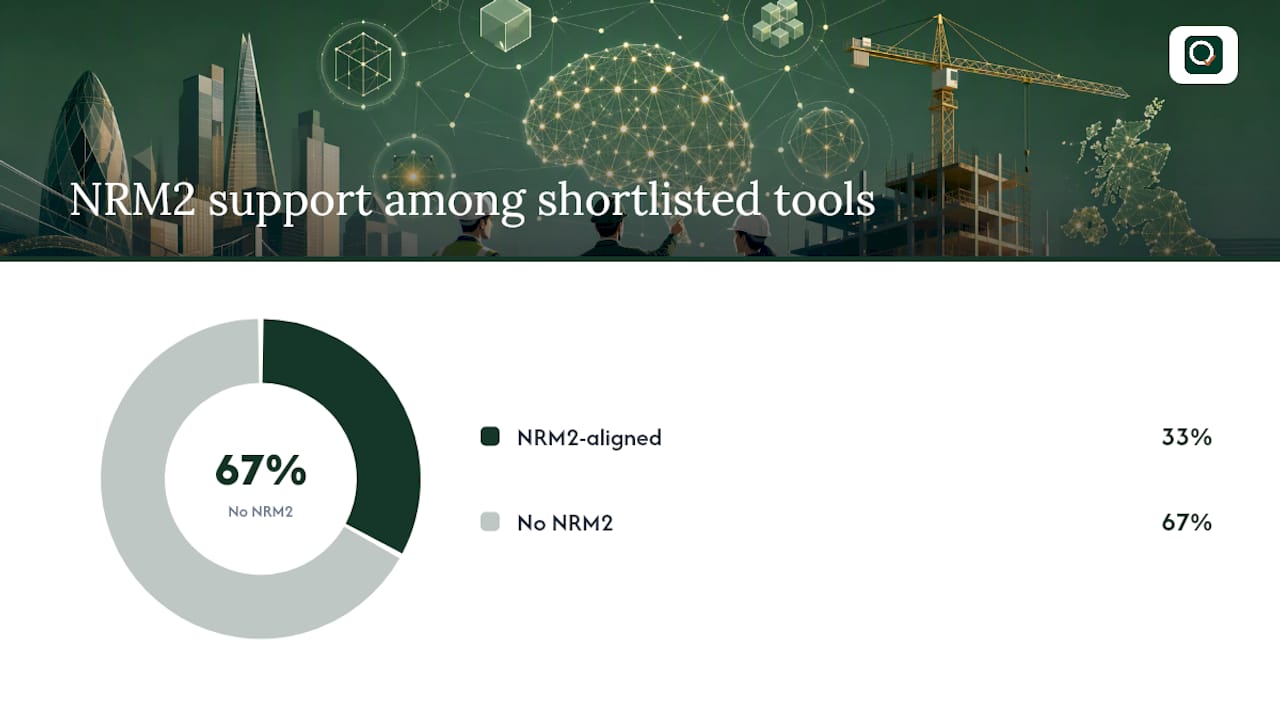
- Quantiflow is the only tool on this list with published GBP pricing and a confirmed NRM2-aligned UK rate library.
- STACK's free plan covers basic takeoff; advanced assembly and reporting features sit behind paid tiers.
- monday.com and monday AI Workspace are project management tools, not quantity takeoff platforms; they appear here because estimating teams frequently use them for scheduling and reporting alongside dedicated takeoff software. Tools like Smartsheet and Celoxis serve a similar adjacent role for project controls and cost tracking.
Short reviews: what does each tool actually do best?
Quantiflow
Quantiflow is built specifically for UK practice. Upload a PDF set of architectural drawings and the platform's cross-referencing engine extracts measured quantities, maps them to NRM2 work sections, and prices them against a live UK rate library. The output is a structured, priceable BoQ ready to export as PDF or Excel. Every stage is logged: quantities can be overridden with a recorded reason, and the audit trail satisfies the professional accountability a QS carries on every project.
Core features:
- NRM2-aligned quantity takeoff from PDF drawings
- Live UK rate library with traceable pricing
- AI cross-referencing across drawing sheets
- Override at key stages with logged justification
- Multi-role collaboration (QS, builder, architect)
- Export to PDF and Excel
Pricing: Quantiflow offers Solo at £39/month and Business at £149/month, with Enterprise custom quoted; a free trial is available.
Pros: NRM2 alignment out of the box; UK rate library removes the need to build your own; audit trail supports professional sign-off. Cons: Focused on UK SME workflows; very large or highly bespoke enterprise projects may need the custom Enterprise tier.
Best for: SME QS teams, sole-practitioner surveyors, and architects producing BoQs for UK residential and commercial projects.
STACK
STACK is a cloud-based takeoff and estimating platform with a broad trade library and a free entry tier that makes it accessible for smaller estimating teams. Its AI layer handles automatic counts, area measurements, and assembly linking from uploaded drawings. The platform is US-centric in its rate data, so UK estimators will need to build or import their own cost libraries. That said, the takeoff speed and collaboration features are genuinely strong for teams running multiple bids simultaneously.
Pros: Free plan available; fast cloud takeoff with good assembly tools. Cons: No NRM2 alignment; UK cost data requires manual setup.
ConstructConnect
ConstructConnect targets large contractors managing complex, multi-trade bid packages. Its AI takeoff sits within a broader bid management ecosystem that includes subcontractor invitation, document management, and bid-day workflows. The platform's depth suits organisations where estimating is one part of a larger procurement process. For a sole-practitioner QS or an SME firm, the feature set and likely price point are more than most projects need.
Pros: Strong bid management and subcontractor workflow; scalable for large organisations. Cons: No NRM2 or UK cost library; pricing not publicly listed.
Togal.AI
Togal.AI focuses on one thing: extracting areas and quantities from PDF drawings quickly. Its AI recognises rooms, spaces, and elements automatically, reducing the time spent on area takeoffs from hours to minutes on straightforward plans. The confidence scoring feature flags where the AI is less certain, giving the estimator a clear signal of where to review manually. Integration options are limited compared to full-suite platforms, but for teams whose bottleneck is raw takeoff speed, it delivers.
Pros: Very fast area recognition; confidence scoring aids review. Cons: No NRM2; limited integrations beyond Excel/PDF export.
Kreo
Kreo connects directly to BIM models in IFC format, extracting quantities from 3D geometry rather than 2D drawings. For QS teams already working in a BIM environment, this removes the translation step between model and takeoff. The platform has some UK-market presence and partial alignment with UK measurement conventions, though it does not carry a dedicated NRM2 library. Teams without BIM workflows will find less value here than those already using Revit or similar tools.
Pros: BIM/IFC integration; 3D quantity extraction reduces manual measurement. Cons: No dedicated NRM2 library; requires BIM-ready project data.
Hover
Hover uses photogrammetry: a contractor photographs a building with a smartphone and the platform generates a 3D model with measured dimensions. It is designed primarily for exterior measurement on refurbishment, roofing, and cladding projects. The visual output is useful for client communication as well as estimating. For QS work on new-build or complex internal fit-out, the scope is limited, but for home-improvement contractors it removes the need for a site measure on straightforward jobs.

Pros: No drawings required; 3D visual output useful for client proposals. Cons: Exterior-focused; not suited to NRM2 or detailed internal takeoffs.
eTakeoff
eTakeoff is a desktop-first platform with a long track record in drawing markup and quantity takeoff. Its AI assists with automatic counts and area recognition, and it integrates with Sage and Excel for pricing. The desktop deployment suits estimators who prefer local data control, though cloud collaboration is more limited than newer cloud-native tools. It remains a solid choice for estimators who want a familiar, markup-driven workflow with AI assistance layered on top.
Pros: Established platform; Sage integration; desktop data control. Cons: No NRM2; cloud collaboration limited compared to cloud-native tools.
Handoff
Handoff is aimed at small builders who need to move from takeoff to client proposal to invoice without switching platforms. The AI assists with quantity extraction from drawings, and the platform generates branded proposals and tracks client approvals. It is not a QS-grade tool in the NRM2 sense, but for a small contractor managing residential projects it reduces the administrative overhead considerably.
Pros: Takeoff-to-invoice in one platform; good for client-facing proposals. Cons: Not NRM2-aligned; limited depth for complex QS work.
Beam AI
Beam AI applies large language model (LLM) technology to bid narrative and specification generation rather than geometric takeoff. It can draft specification clauses, bid summaries, and scope descriptions when connected to estimating workflows via API. LLM integrations like this are increasingly used for automating repetitive bid text, as demonstrated by tools such as Exayard's ChatGPT integration, which can run takeoffs and generate estimates when paired with construction-specific tooling. Auditability of AI-generated text remains a buyer concern, and Beam AI's output requires human review before submission.
Pros: Speeds up bid narrative and specification drafting. Cons: No geometric takeoff; output requires careful review; no NRM2.
WorkPack
WorkPack combines mobile field data capture with cost tracking, making it useful for teams where the estimator and site supervisor are the same person or work closely together. Quantities captured on site feed back into the cost model, reducing the gap between estimate and actual. It is not a drawing-based takeoff tool in the traditional sense, but for small builders managing live projects it provides a practical field-to-office cost loop.
Pros: Mobile-first; field quantities feed cost tracking directly. Cons: Not a drawing-based takeoff platform; no NRM2.
monday.com and monday AI Workspace
monday.com is a project and workflow management platform, not a quantity takeoff tool. Its AI Workspace layer adds smart summaries, task automation, and content generation to project workflows. Many estimating teams use it alongside dedicated takeoff software for scheduling, resource planning, and reporting. At £9/user/month for paid plans, it is accessible, and its 200+ integrations include Xero, HubSpot, and Jira. The distinction matters: monday.com manages the work around an estimate, not the takeoff itself.
How we tested and chose these picks
The shortlist was built by evaluating each tool against eight criteria weighted towards UK practice requirements. NRM2 alignment and auditability carried the highest weight, because a UK QS's professional liability depends on traceable, overridable outputs.
Evaluation criteria and weighting:
- NRM2 alignment and UK cost library (highest weight) — does the tool produce output structured to NRM2 work sections, and does it carry a live UK rate library?
- Takeoff accuracy — how closely do AI-extracted quantities match a manually verified takeoff on the same drawing set?
- Auditability — can the QS override AI outputs with a logged reason, and is a full change log available?
- Takeoff speed — time from drawing upload to structured quantity output on a representative residential project
- Integration ease — how readily does the tool connect to Excel, accounting software, BIM tools, and project management platforms such as Smartsheet or Celoxis?
- Deployment model — cloud, desktop, or hybrid; and whether multi-user collaboration is supported
- Support and onboarding — availability of UK-based support, guided onboarding, and training resources
- Pricing transparency — are GBP prices published, and is a free trial available without a sales call?
Test protocol:
- Trial accounts or published demos were accessed for each tool where available.
- A representative set of UK residential drawings (two-storey extension, new-build terrace) was used as the test data set where the platform permitted upload.
- Quantities were cross-checked against a manually produced NRM2 takeoff.
- Published documentation, vendor onboarding materials, and third-party roundups (including the 2026 AI estimating software review) were used to fill gaps where trial access was not available.
Limitations: Vendor platforms update frequently; pricing and features may change after publication. Where trial access was unavailable, assessments rely on published documentation and vendor-supplied materials. Enterprise pricing was not independently verified.
How do you pick the right AI estimating tool for your UK practice?
The single most important criterion for a UK quantity surveyor is NRM2 alignment combined with a full audit trail. Without NRM2 structure, the output requires significant manual rework before it can be used in a formal BoQ. Without an audit trail, the QS cannot demonstrate professional accountability if a figure is challenged. Everything else follows from those two requirements.
Selection criteria checklist:
- NRM2 alignment — does the tool structure output to NRM2 work sections, or does it produce a generic quantity list you must remap?
- UK rate library — is there a live, updatable UK cost library, or will you need to import your own rates? A live UK rate library is the difference between a priced BoQ and a quantity list.
- Takeoff automation — what percentage of a typical drawing set can the AI process without manual intervention?
- Auditability — can you override AI outputs, log the reason, and export a change history?
- Integrations — does it connect to your existing Excel workflow, accounting software, or BIM tools?
- Deployment model — cloud suits collaboration; desktop suits data-sensitive practices. Hybrid is available from some vendors.
- Data security — where is project data stored? Is it UK or EU-based? What are the vendor's data retention and deletion policies?
- Support and onboarding — is UK-based support available? Is there a structured onboarding programme, or are you left with documentation?
- Pricing transparency — are GBP prices published? Is a free trial available without a mandatory sales call?
Questions to ask vendors in demos:
- Can you show me a takeoff structured to NRM2 work sections on a UK residential drawing?
- What happens when the AI misidentifies an element? Can I override it and is that override logged?
- Where is my project data stored, and what is your data retention policy?
- Does your rate library cover UK regional cost variations?
- What integrations are available with Xero, Sage, or Revit?
- What does onboarding look like for a two-person QS team?
Red flags to watch for:
- No published GBP pricing and no trial without a sales call
- No audit trail or override capability
- Rate library built on US or generic European data
- No mention of NRM2 in product documentation
Pro Tip: Run your pilot on a project you have already priced manually. Upload the same drawing set to the AI tool and compare quantities line by line. This gives you a concrete accuracy benchmark before you commit to a subscription, and it surfaces any NRM2 mapping gaps early.
Who should pick which tool?
For most UK quantity surveyors and SME construction firms, Quantiflow is the clearest fit: NRM2 alignment, a live UK rate library, and a published GBP price point make it the only tool on this list purpose-built for UK practice. The decision for other team types is more nuanced.
Recommendation by team type:
- Large contractor with multi-trade bid packages — ConstructConnect. The bid management ecosystem suits complex, multi-stakeholder procurement.
- BIM-enabled QS team — Kreo. 3D quantity extraction from IFC models removes the 2D translation step.
- Refurbishment or home-improvement contractor — Hover. Photogrammetric measurement from site photos suits exterior-focused projects.
- Small builder needing takeoff to invoice — Handoff. The proposal-to-invoice workflow reduces administrative overhead for residential jobs.
- Estimator focused on raw takeoff speed — Togal.AI. Fast area recognition from PDFs with confidence scoring.
- Team needing project management alongside estimating — monday.com alongside a dedicated takeoff tool.
Next steps:
Key takeaways
Quantiflow is the recommended AI estimating tool for UK quantity surveyors because it is the only shortlisted platform with NRM2-aligned output, a live UK rate library, and published GBP pricing built for SME practice.
| Point | Details |
|---|---|
| NRM2 alignment is non-negotiable for UK QS | Only Quantiflow on this shortlist delivers NRM2-structured output and a live UK rate library out of the box. |
| Audit trail protects professional accountability | Every override and quantity change must be logged; without a change log, AI output cannot support professional sign-off. |
| Match tool to team size and workflow | Large contractors suit ConstructConnect; BIM teams suit Kreo; small builders suit Handoff or Hover; UK QS teams suit Quantiflow. |
| Pilot on a known project first | Run the AI tool against a manually priced drawing set to benchmark accuracy before committing to a subscription. |
| Quantiflow: recommended UK pick | Solo at £39/month, Business at £149/month, custom Enterprise available; free trial at quantiflow.co.uk for NRM2-aligned takeoffs. |
AI estimating tools and professional judgement: a perspective
The conversation around AI estimating software tends to polarise quickly. On one side, vendors promise that AI will replace manual takeoff entirely. On the other, some QS professionals dismiss the tools as unreliable black boxes. Both positions miss the point.
The tools that actually work in UK practice are the ones designed to augment the QS's judgement, not circumvent it. An AI that extracts quantities from a drawing set and maps them to NRM2 work sections is doing the repetitive, time-consuming part of the job. The professional still decides whether those quantities are right, whether a site condition changes the measurement basis, and whether the rate applied reflects the actual procurement context. That is not a limitation of the technology; it is the correct division of labour.
What concerns me about some tools in this category is the absence of a meaningful audit trail. If an AI produces a quantity and the QS cannot override it, log the reason, and export a record of every change, then the tool is not fit for professional use in the UK. The QS carries the liability. The tool should carry the evidence.
The practical adoption path is straightforward: pilot on a project with a known outcome, measure the accuracy gap, train the team on the override and review process, and build the audit log into your standard sign-off procedure. AI estimating for construction is not a shortcut to skip professional review. It is a way to spend less time on extraction and more time on the judgements that actually require expertise. For a detailed look at how to balance automation with professional accountability, the Quantiflow guide to QS professional judgement is worth reading before you commit to any tool.
Quantiflow: NRM2-aligned takeoffs without the manual grind
UK quantity surveyors spend hours on takeoff that AI can handle in minutes. Quantiflow gives you NRM2-structured quantities from PDF drawings, a live UK rate library, and a full audit trail, all at a price point built for SME practice. Solo plans start at £39/month; Business plans at £149/month; custom quoted Enterprise plans available. No US-centric rate data to remap, no NRM2 rework after export.
The free trial lets you upload your own drawings and produce a priced BoQ before you commit. Enterprise teams can request a UK-focused pilot with dedicated onboarding. Start your free trial or book a demo at quantiflow.co.uk and see the difference a purpose-built UK tool makes on your next project.
Useful sources and further reading
The sources below were used in researching this article. QuantiFlow links lead to the platform and its blog; external links point to independent industry references.
QuantiFlow resources:
- 10 Best AI Estimating Software Reviewed in 2026
- AI Quantity Takeoffs for UK QS Firms | QuantiFlow
- AI and quantity surveyor professional judgement in 2026
- Construction cost benchmarking methods: a 2026 UK guide
- Run construction takeoffs and estimates from ChatGPT - Exayard
- Project management | Smartsheet
- Celoxis — Project management software
Industry and external references:
- 10 Best AI Estimating Software Reviewed in 2026 — independent market roundup used to validate the shortlist
- Run construction takeoffs and estimates from ChatGPT — Exayard — example of LLM integration for takeoff and bid generation
| Resource type | Link | Use |
|---|---|---|
| QuantiFlow platform | quantiflow.co.uk | Free trial, pricing, NRM2 takeoff demo |
| QuantiFlow blog: QS judgement | blog.quantiflow.co.uk | Professional adoption guidance |
| QuantiFlow blog: benchmarking | blog.quantiflow.co.uk | UK rate library and cost benchmarking context |
| Independent roundup | thedigitalprojectmanager.com | Market consensus on top AI estimating tools |
| LLM integration example | exayard.com | ChatGPT-based takeoff and estimate generation |