
A digital QS workflow captures site measurements and evidence digitally at the point of decision, maps them to structured takeoffs and Bill of Quantities outputs, and keeps a revision trail that survives scrutiny. The single best starting point is capture at source: mobile logging with timestamped evidence, wired into a digital takeoff pipeline using tools such as Bluebeam and platforms like QuantiFlow. Everything else in your workflow builds on that one decision.
TL;DR:
- Digital workflows significantly reduce delays by capturing site evidence in real-time with timestamps and linking directly to live drawings and estimates.
- Most traditional QS failures stem from data lag, scattered evidence, and revision confusion, which digital tools can directly address through structured linkage and audit trails.
- Implementing a practical digital QS process should start with auditing current flows, defining capture points, and running small pilots before scaling across projects.
- Live links between takeoff tools and BoQ systems, along with structured evidence and revision control, improve accuracy and support dispute resolution during valuations.
- QuantiFlow automates takeoff-to-BoQ workflows with OCR and revision tracking, requiring human sign-off at each stage, making it suitable for both solo practitioners and teams.
Table of Contents
- How digital tools change day-to-day quantity surveying
- Where traditional QS workflows strain and common failure modes
- Core tools and functions to include in a digital QS workflow
- Step-by-step: implementing a practical digital QS workflow
- Integrating digital inputs with existing QS systems and spreadsheets
- Managing variations, valuations and the audit trail in a digital workflow
- Benefits, typical efficiency gains and ROI evidence
- QuantiFlow's approach to the same workflow pattern
- Which digital changes to prioritise, and why
- Putting the workflow into practice with QuantiFlow
- Sources
How digital tools change day-to-day quantity surveying
The biggest shift is speed between decision and record. A site instruction that once sat in a site diary for three days now lands in a commercial system within minutes, because capture-at-source reduces the delay between what happens on site and what your commercial team can act on.
That change ripples through the rest of the week. When a takeoff is linked to a live drawing rather than a static PDF export, your estimate updates automatically the moment a revision lands, rather than three days later when someone notices the discrepancy.
Day to day, this looks like:
- Site staff logging progress and variations on a phone, with photos attached at the moment of capture.
- Quantities recalculating automatically when a linked drawing is revised, rather than manually re-measured.
- Commercial and site teams working from the same evidence trail instead of chasing each other for context.
Where traditional QS workflows strain and common failure modes
Most QS teams don't fail because of bad measurement. They fail because of bad timing and fragmentation. A site foreman jots a variation on a scrap of paper on Tuesday; it reaches the QS on Friday, by which point the memory of exactly what changed has already softened.
The recurring failure patterns are predictable once you've seen them a few times:
- Data lag: handwritten site notes and delayed reports mean commercial decisions get made on stale information.
- Fragmented evidence: proof of a variation scattered across emails, WhatsApp messages, paper diaries and three different spreadsheets.
- Revision confusion: nobody is entirely sure which drawing revision the current BoQ actually reflects, and there's no audit trail to check.
Each of these is a workflow problem, not a skills' problem. Fixing them doesn't require better quantity surveyors. It requires better capture and linkage.
Core tools and functions to include in a digital QS workflow
A working digital QS stack needs four categories of tool, and the specific brand matters less than whether each category delivers the right function.
- Digital takeoff and PDF measurement: scale calibration, dynamic fills, and running measurement totals that update as you mark up drawings. Bluebeam remains the reference point here, and its Quantity Link feature syncs measurements directly to Excel, so totals move when the drawing does.
- BIM/5D quantification: model-linked quantities that connect directly to programme and cost data, letting you pull quantities straight from the model rather than re-measuring what a designer has already defined. This is the 4D/5D digitised workflow that academic and practitioner literature increasingly treats as the natural extension of BIM adoption.
- Mobile site capture: apps that attach photos, annotations and timestamps to every record, so evidence exists the moment something happens, not three days later.
- OCR and export pipelines: the ability to pull structured data out of scanned drawings and push it into Excel, CSV or IFC formats for handover into your existing cost systems. Not every PDF is equally OCR-ready, which is worth understanding before you pick a drawing OCR pipeline.
Step-by-step: implementing a practical digital QS workflow
Rolling out a digital QS workflow works best as a controlled sequence rather than a big-bang switch. Here's the order that keeps risk low while still delivering visible progress quickly.
- Audit your current data flows. Map exactly where information moves from site to office today, and mark every point where delay or duplication happens.
- Define capture points and ownership. Decide who logs variations on site, who reviews them, and how often. Ambiguity here is where most rollouts stall.
- Set integration requirements before choosing vendors. Specify what export formats, audit logging and BoQ mapping you need. Choose tool categories first; pick specific products once requirements are clear.
- Run a short pilot on one live project. Test field templates and BoQ mappings in practice, then adjust before rolling out further. Piloting with sign-off gates intact minimises the risk of an automated output slipping through unchecked.
- Embed sign-off gates and train your team. Every automated takeoff needs a human review step, and every team member needs enough confidence in the new tools to actually use them.
Pro Tip: Treat your pilot as a documentation exercise, not just a trial. The templates, mappings and edge cases you uncover in the first project become the playbook for every project after it.
Integrating digital inputs with existing QS systems and spreadsheets
You don't need to rip out your existing spreadsheets to go digital. Where possible, prefer live links, such as Bluebeam's Quantity Link approach, so figures update automatically rather than being re-typed. Where a live link isn't available, a scheduled batch export at a fixed point each week is a reasonable second choice.
- Map each takeoff field to a specific BoQ line item, and keep a change log whenever that mapping is adjusted.
- Include a consistent ID column across revisions so quantities don't get duplicated or dropped when drawings update.
- Keep an exportable audit trail in CSV, Excel and PDF form, ready for valuation and payment record purposes.
Managing variations, valuations and the audit trail in a digital workflow
Variations are where disputes usually start, and they're also where a digital workflow earns its keep fastest. A timestamped photo attached to an annotated drawing is far harder to argue with than a verbal recollection three weeks later.

Link every variation directly to the relevant BoQ line, and record who approved it and when, with that metadata stored alongside the evidence rather than in a separate email thread. Our drawing revision control approach becomes genuinely useful at this stage, because it ties each variation to a specific, identifiable drawing version rather than a vague "latest" copy.
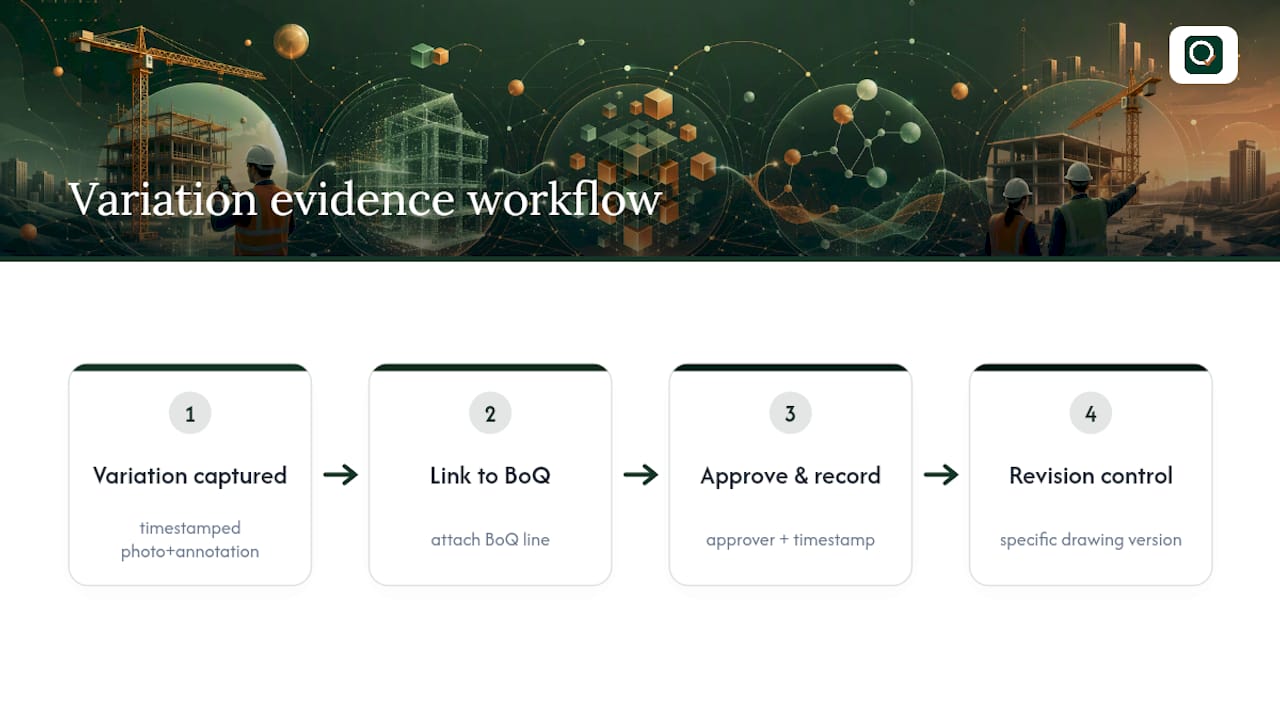
The payoff shows up at valuation time. When every variation carries its own evidence trail, valuation meetings stop being negotiations over what happened and start being confirmations of what was already recorded.
Benefits, typical efficiency gains and ROI evidence
The business case for digital QS workflows rests on three measurable outcomes: fewer re-measures, faster valuation agreement, and better cashflow from reduced disputes.
Firms that embed AI and data skills through targeted training report measurable productivity gains and cost savings, not from the tools alone but from staff confident enough to use them properly.
Saved tool sets and calibrated measurements in takeoff software also cut rework directly, because repeatable measurement templates mean fewer errors carried forward from one drawing revision to the next.
QuantiFlow's approach to the same workflow pattern
QuantiFlow follows exactly the pattern this article recommends. It automates NRM2-aligned takeoffs from architectural drawings using an OCR pipeline, cross-references quantities against the drawing set, and exports structured BoQ output while logging every revision.
The design choices worth knowing about:
- Every automated output requires human sign-off before it's treated as final, preserving the surveyor's professional judgement rather than replacing it.
- Pricing runs from Solo at £39 a month for individual practitioners through to Business at £149 a month for teams, with custom Enterprise terms for larger firms.
- The audit log tracks who changed what and when, which matters when a valuation is queried months later.
- Automated BoQ generation still routes through a human sign-off step at every key stage, by design.
Which digital changes to prioritise, and why
Most firms overthink the tool stack and underthink the sequence. Buying five platforms in one quarter guarantees confusion, not transformation. Start with capture at source, because every other benefit in this article, faster valuations, cleaner audit trails, fewer disputes, depends on evidence existing at the moment something happens rather than being reconstructed afterwards.
Pilot one project before you scale anything. A single well-documented pilot teaches you more about your own workflow gaps than a year of vendor demos. And keep professional judgement explicit at every sign-off gate. The firms getting real value from automation aren't the ones removing the QS from the loop. They're the ones freeing that QS to spend less time re-measuring and more time exercising the judgement they were trained for, a point explored further in how AI is actually being used by quantity surveyors rather than the more speculative claims often made about it.
— Michael
Putting the workflow into practice with QuantiFlow
QuantiFlow exists specifically to close the gap between "we should digitise" and "we have a working pipeline". Rather than adding another disconnected tool to an already fragmented stack, it automates the takeoff-to-BoQ step directly from your architectural drawings, using the same OCR and cross-referencing approach described throughout this article, then hands you a structured, priceable output backed by a live UK rate library.
If you're running a solo practice, the Solo tier at £39 a month gives you the core takeoff automation without paying for team features you don't need yet. Growing firms tend to fit the Business tier at £149 a month, which adds multi-role collaboration and audit logging across a whole team. In both cases, professional judgement stays where it belongs: with you, at the sign-off stage, on every takeoff QuantiFlow produces. If the workflow above sounds like where you want your practice to go, start with QuantiFlow and see how the pipeline handles your next set of drawings.
Sources
- Digital Solutions for Quantity Surveying: Transform Cost Management with WorkMobileForms
- Construction Takeoff Software: Digital Solutions for Accurate Estimation – Bluebeam
- Disrupting themselves before someone else does: how QS is building a future-ready workforce with Multiverse