
For UK quantity surveyors and SME practices, Quantiflow is the recommended pick for the best quantity takeoff software in 2026. It automates NRM2-aligned Bills of Quantities directly from PDF architectural drawings, preserves your professional judgement at every stage, and is priced for practices that cannot justify enterprise-level spend. If your firm produces tender BoQs regularly and needs audit-ready, traceable outputs, Quantiflow is where to start.
Here is the shortlist at a glance:
- Quantiflow — Best for UK QSs and SME practices needing automated NRM2 BoQ outputs with audit trails. Start with a trial on a live tender drawing.
- CostX — Best for firms with advanced 2D and BIM measurement requirements and complex object quantification workflows.
- Bluebeam Revu — Best for teams working primarily from PDF drawings who rely on Excel-linked estimating workflows and markup collaboration.
- Autodesk Takeoff — Best for organisations already standardised on Revit and Autodesk BIM model workflows.
- Buildsoft Cubit — Best for estimating teams that prefer established desktop workflows with integrated labour and material assemblies.
- PlanSwift — Best for trade contractors and smaller firms needing fast, intuitive point-and-click on-screen takeoff.
- On-Screen Takeoff (OST) — Best for larger contractors and estimating teams needing scalable bid management alongside digital takeoff.
- STACK — Best for teams prioritising cloud-based collaboration and remote access across distributed estimating teams.
Table of Contents
- How does each quantity takeoff tool compare?
- Why Quantiflow is the recommended pick for UK quantity surveyors
- CostX: advanced measurement and BIM-capable takeoff
- Bluebeam Revu: PDF markup, takeoff and Excel-linked workflows
- Autodesk Takeoff: when you're already in the Autodesk ecosystem
- Buildsoft Cubit: estimator-focused desktop takeoff and pricing
- PlanSwift and On-Screen Takeoff: two established on-screen options
- When should you pick each type of tool?
- How to choose quantity takeoff software for your UK practice
- Is takeoff software worth the cost for UK SMEs?
- How we evaluated these tools
- What is the best tool by firm size and project type?
- UK construction standards compliance beyond NRM2
- Security and data privacy for UK construction firms
- Key takeaways
- The gap between takeoff speed and BoQ quality
- Quantiflow: audit-ready NRM2 takeoffs built for UK practice
- Useful sources and further reading
How does each quantity takeoff tool compare?
| Tool | Best for | Measurement capability | NRM2 / BoQ output | Automation & AI | Deployment & collaboration | Pricing & trial | UK suitability | Integrations |
|---|---|---|---|---|---|---|---|---|
| Quantiflow | UK QSs and SME practices needing NRM2 BoQ automation | 2D (PDF drawings) | NRM2-aligned BoQ; Excel and PDF export | AI cross-referencing engine; drawing revision detection; professional-judgement override | Cloud; multi-role collaboration; audit log | Solo £39/mo, Business £149/mo, Enterprise custom; trial available | Purpose-built for UK NRM2 practice; live UK rate library | Excel, PDF; designed for UK estimating workflows |
| CostX | Firms needing deep 2D and BIM measurement | 2D and 3D/BIM | BoQ export; Excel output | Limited AI automation; strong manual measurement tools | Desktop and cloud hybrid | Licence-based; contact vendor for pricing | Good; used in UK market | Revit, Excel, estimating packages |
| Bluebeam Revu | PDF-first teams using Excel-based estimating | 2D (PDF) | Quantity link to Excel; no native NRM2 BoQ | Dynamic fill; limited AI automation | Desktop and cloud; strong collaboration | Subscription; Basics, Core, Complete tiers; trial available | Widely used in UK; no native NRM2 output | Excel, SharePoint, Procore |
| Autodesk Takeoff | Autodesk/BIM-standardised organisations | 2D and 3D/BIM | Quantity export; no native NRM2 BoQ | Automated 3D quantity extraction from models | Cloud; Autodesk Construction Cloud | Subscription; part of ACC; contact vendor | Strong for BIM-heavy UK contractors | Revit, ACC, Autodesk suite |
| Buildsoft Cubit | Estimating teams preferring desktop workflows | 2D | BoQ-style output; Excel export | Minimal automation | Desktop (Windows) | Licence-based; contact vendor | Used in UK and Australian markets | Excel, estimating assemblies |
| PlanSwift | Trade contractors and smaller firms | 2D | Quantity export to Excel; no native NRM2 | Limited automation; assembly-based | Desktop; limited cloud | Subscription; contact vendor for UK pricing | Used in UK; no native NRM2 | Excel, QuickBooks, estimating tools |
| On-Screen Takeoff (OST) | Larger contractors needing bid management | 2D | Quantity export; no native NRM2 BoQ | AI-assisted features available | Desktop and cloud | Subscription; contact vendor | Used in UK market | ConstructConnect ecosystem, Excel |
| STACK | Cloud-first, distributed estimating teams | 2D | Quantity export; no native NRM2 BoQ | Some automation features | Cloud; strong sharing and collaboration | Subscription; free trial available | Used in UK; no native NRM2 | Excel, estimating integrations |

Why Quantiflow is the recommended pick for UK quantity surveyors
Quantiflow was built specifically for the way UK QSs work. Upload a set of PDF architectural drawings and the platform's AI cross-referencing engine extracts quantities, reconciles them across sheets, and structures the output to NRM2 classifications. The result is a BoQ you can export to Excel or PDF and hand to a client or contractor without rebuilding it from scratch.
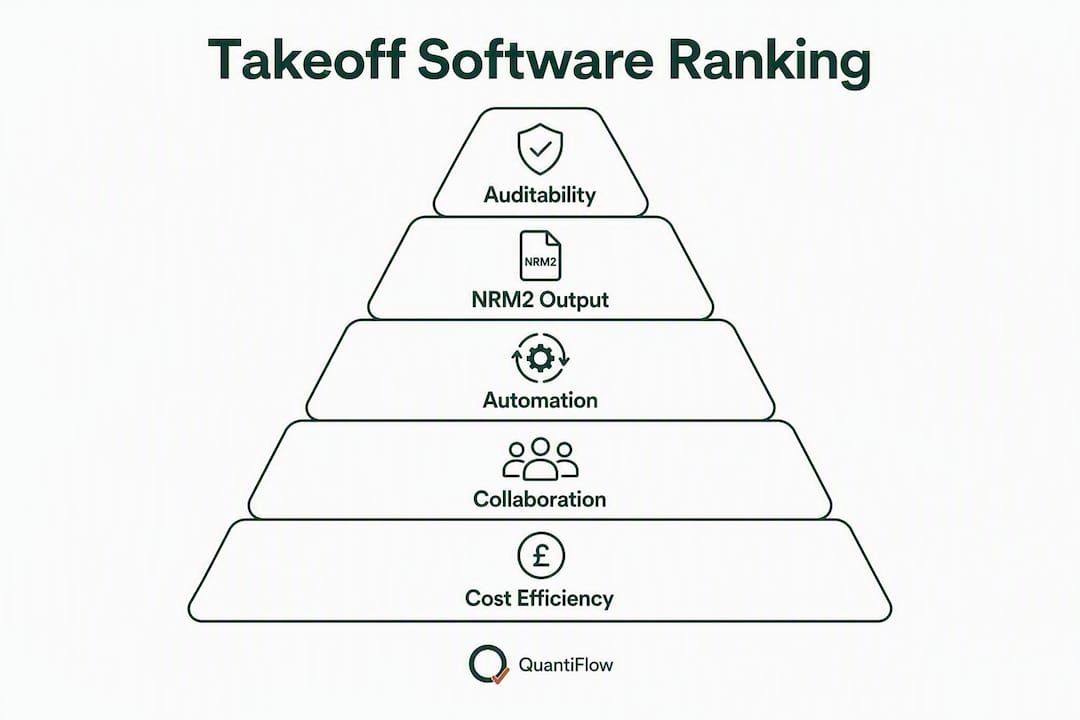
What separates Quantiflow from general-purpose digital takeoff software is the NRM2 alignment baked into the output, not bolted on afterwards. Every quantity is traceable through an audit log, and the platform flags drawing revisions so you can update affected quantities without re-running the entire takeoff. Crucially, the AI assists rather than replaces professional judgement: you can override any AI-generated quantity at any stage, and the override is recorded in the audit trail.
Pros:
- Automated NRM2-aligned BoQ output from PDF drawings
- AI cross-referencing engine detects drawing revisions and flags affected quantities
- Audit log records every override and change for professional accountability
- Live UK rate library for direct pricing within the platform
- Excel and PDF export compatible with standard UK estimating workflows
- Cloud-based with multi-role collaboration for QS, builder and architect teams
- Seat-based SaaS pricing accessible to SMEs (Solo at £39/month)
Cons:
- 2D PDF-focused; not designed for BIM object extraction from Revit models
- Newer platform; fewer third-party integrations than established desktop tools
- Enterprise pricing is custom and requires a conversation with the team
Pricing tiers:
- Solo (£39/month): single-user, suited to sole-practitioner QSs and small builders
- Business (£149/month): multi-seat, suited to SME practices with collaborative workflows
- Enterprise: custom pricing for larger firms or volume deployments
Visit the Quantiflow product page for current pricing and trial options.
Typical UK workflow: An SME QS receives a tender package with 30 PDF drawing sheets. They upload the set to Quantiflow, the AI extracts quantities and maps them to NRM2 work sections, the QS reviews, overrides two misclassified items, and exports a priced BoQ to Excel within the same session. The audit log captures every step. That is the workflow Quantiflow is built for.

Pro Tip: Run your first Quantiflow session on a recently completed tender so you can compare the AI output line-by-line against your existing BoQ. It is the fastest way to calibrate confidence in the tool before using it on live work.
CostX: advanced measurement and BIM-capable takeoff
CostX is a well-regarded measurement tool used across the UK and internationally, with genuine depth in both 2D and 3D/BIM workflows. Its strength is measurement precision: you can work from PDF plans, CAD drawings, or BIM models, and extract quantities from model objects directly. For firms that regularly price complex structural or MEP packages where BIM models are available, that capability is meaningful.
Pros:
- Strong 2D and 3D measurement tools with BIM object quantification
- Supports Revit and IFC model formats
- Flexible export to Excel and estimating packages
- Established product with a substantial UK user base
Cons:
- Steeper learning curve than PDF-first tools
- No native NRM2-aligned BoQ automation; output requires manual structuring to NRM2 classifications
- Licence-based pricing can represent higher upfront cost for smaller practices
- Less suited to firms whose primary need is fast, audit-ready NRM2 BoQ production from PDFs
The decision between CostX and Quantiflow usually comes down to BIM exposure. If your practice regularly receives Revit models and needs to extract quantities from model objects, CostX's BIM capability is a genuine differentiator. If your workflow is PDF-drawing-based and your output is a structured NRM2 BoQ, Quantiflow's automation delivers that output faster and with less manual classification work.
Bluebeam Revu: PDF markup, takeoff and Excel-linked workflows
Bluebeam Revu is one of the most widely used PDF tools in UK construction, and its takeoff capabilities are genuinely useful for teams that live in PDF drawings. The dynamic fill tool lets you measure areas by colour-filling regions on a plan, and the quantity link feature pushes measurements directly into Excel. For contract administrators and trade estimators who price from spreadsheets, that connection is practical.
Pros:
- Fast and accurate on PDF drawings with dynamic fill and measurement tools
- Strong markup and annotation for collaborative document review
- Quantity link to Excel suits teams already using spreadsheet-based estimating
- Cloud collaboration via Bluebeam Studio for distributed teams
- Widely adopted in UK construction; good training resources available
Cons:
- No native NRM2-aligned BoQ output; quantities feed into Excel and require manual structuring
- AI automation is limited compared to purpose-built takeoff platforms
- Primarily a PDF tool; not suited to BIM model quantification
- Estimating workflow depends on the quality of the Excel template the team maintains
Bluebeam Revu works well as a complementary tool alongside a dedicated BoQ platform. Teams that use it for markup and collaboration, then pass quantities into a structured NRM2 template in Excel, get good results. As a standalone NRM2 BoQ production tool, it requires more manual effort than Quantiflow.
Autodesk Takeoff: when you're already in the Autodesk ecosystem
Autodesk Takeoff (part of Autodesk Construction Cloud, now marketed as Forma Takeoff) is a cloud-based quantification tool that handles both 2D takeoffs and automated 3D quantity extraction from constructible models. For organisations that have standardised on Revit and the Autodesk Construction Cloud platform, the integration is genuinely smooth: model objects carry quantity data that the tool surfaces without manual measurement.
Pros:
- Native integration with Revit and Autodesk Construction Cloud
- Automated 3D quantity extraction from BIM models
- 2D takeoff capability for plan-based work alongside model-based workflows
- Cloud-based with strong document management within the Autodesk ecosystem
Cons:
- Meaningful value requires Revit model discipline; PDF-only firms gain less
- No native NRM2-aligned BoQ output; quantities require manual mapping to NRM2 classifications
- Subscription is part of Autodesk Construction Cloud, which can represent significant cost for smaller practices
- Firms not already in the Autodesk ecosystem face a steep adoption curve
For UK contractors working on large, BIM-mandated projects where Revit models are available and maintained, Autodesk Takeoff is a logical choice. For SME QS practices producing NRM2 BoQs from PDF tender packages, the overhead of the Autodesk ecosystem rarely justifies the switch.
Buildsoft Cubit: estimator-focused desktop takeoff and pricing
Buildsoft Cubit is a long-standing estimating and takeoff platform with a loyal following among estimators who prefer a desktop-first workflow. Its strength is the integration between takeoff and estimating: you measure on screen, and the quantities feed directly into Cubit's estimating assemblies, which include labour and material rates. For teams that have built their pricing around Cubit's assembly libraries, that continuity has real value.
Pros:
- Integrated takeoff and estimating in a single desktop application
- Strong labour and material assembly libraries for direct pricing
- Familiar workflow for estimators who have used it for years
- Suited to residential and commercial build pricing
Cons:
- Desktop-only (Windows); limited cloud collaboration
- No native NRM2-aligned BoQ output structured to UK measurement rules
- Learning curve for new users unfamiliar with the assembly-based pricing model
- Less suited to QS practices whose primary deliverable is a structured NRM2 BoQ
Cubit suits estimating teams that price builds using their own assembly libraries and want takeoff and pricing in one place. It is less suited to QS practices whose primary output is a client-facing NRM2 BoQ rather than an internal estimate.
PlanSwift and On-Screen Takeoff: two established on-screen options
PlanSwift
PlanSwift is a point-and-click on-screen takeoff tool with a straightforward interface that trade contractors and smaller estimating teams find accessible. You load a PDF or image plan, click to measure lengths, areas and counts, and the quantities feed into assemblies or export to Excel. Setup is fast, and the drag-and-drop assembly workflow suits estimators who price by trade package.
- Best for trade contractors and smaller firms needing quick, intuitive on-screen takeoff
- Integrates with Excel and QuickBooks for pricing and accounting workflows
- No native NRM2 BoQ output; quantities require manual structuring
- Desktop-focused with limited cloud collaboration
On-Screen Takeoff (OST)
On-Screen Takeoff, from ConstructConnect, is one of the most established names in digital takeoff software. It has a larger feature set than PlanSwift and is better suited to larger estimating teams that need scalable bid management alongside takeoff. AI-assisted features are available in recent versions, reducing some manual measurement steps.
- Best for larger contractors and estimating teams managing multiple bids simultaneously
- Scalable bid management and workflow tools built in
- AI-assisted measurement features available
- No native NRM2-aligned BoQ; output feeds into ConstructConnect's broader ecosystem
- Desktop and cloud deployment options
Neither PlanSwift nor OST produces NRM2-aligned BoQ output natively. Both are strong on-screen takeoff tools for their respective audiences, but UK QSs whose primary deliverable is a structured NRM2 BoQ will need to add manual classification work on top of the raw quantities either tool produces.
When should you pick each type of tool?
The right choice depends on four factors: your firm's size, the drawings you typically receive, the output your clients expect, and your BIM exposure.
-
You are a UK QS or SME practice producing NRM2 BoQs from PDF drawings. Quantiflow is the direct fit. The NRM2 alignment is built into the output, the audit trail satisfies professional accountability requirements, and the pricing is accessible from sole-practitioner level upward.
-
Your firm regularly receives Revit models and needs BIM object quantification. CostX or Autodesk Takeoff are the stronger options. CostX suits firms that want flexibility across 2D and BIM workflows without committing to the full Autodesk ecosystem; Autodesk Takeoff suits firms already standardised on Autodesk Construction Cloud.
-
Your team works primarily from PDFs and prices using Excel spreadsheets. Bluebeam Revu's quantity link to Excel is a practical fit, particularly if your team already uses Bluebeam for markup and document review.
-
You are a trade contractor or smaller estimating team pricing by trade package. PlanSwift's fast setup and assembly-based workflow suits this profile well. OST suits the same audience at larger scale, with bid management features that matter when you are running multiple tenders simultaneously.
-
Your team is distributed and needs cloud-first collaboration. STACK's cloud-native architecture and sharing tools suit remote estimating teams. Quantiflow also operates in the cloud and supports multi-role collaboration, making it a strong alternative for distributed QS teams that also need NRM2 output.
-
You are an estimating team with established Cubit assembly libraries. Buildsoft Cubit's integrated takeoff and pricing workflow is worth preserving if your rate libraries are already built there.
The practical trade-off that matters most for UK QSs is between speed and auditability. PDF-first tools like Bluebeam are fast but require manual NRM2 structuring. BIM tools like Autodesk Takeoff are powerful but demand model discipline. Quantiflow sits in the middle: automated NRM2 output from PDFs, with the audit trail that professional accountability requires.
How to choose quantity takeoff software for your UK practice
Selection criteria
- Measurement scope: Does the tool handle the drawing types you receive (2D PDFs, CAD, BIM models)? Confirm this with a sample file before committing.
- NRM2 output: Does the tool produce a structured NRM2-aligned BoQ, or does it export raw quantities that you then classify manually? For UK QSs, this distinction determines how much post-processing work remains.
- AI automation and review controls: AI-assisted takeoff can reduce manual counting time, but the tool must allow you to review, override and record changes. Treating AI as an assistant that surfaces initial quantities is the right governance posture; the QS must verify cross-sheet consistency and NRM2 classification before publishing.
- Integrations: Does the tool export to the formats your estimating team uses? Excel compatibility is the baseline; Revit and accounting integrations matter for larger practices.
- Security and data residency: Where is your drawing data stored? UK construction firms handling sensitive project data should confirm data residency and access controls with the vendor.
- Support and training: Is UK-based support available? What onboarding resources exist for new users?
- Cost of ownership: Compare total cost across a 12-month period, including licences, training time and any per-project fees.
Questions to ask vendors during demos
- Which drawing formats do you support, and how do you handle multi-sheet PDF sets?
- How does the tool detect and handle drawing revisions mid-project?
- Does the output map to NRM2 work sections, or does that require manual classification?
- Is there an audit log that records quantity overrides and changes?
- Do you maintain a UK rate library, and how frequently is it updated?
- What are the trial or pilot terms, and can we test with our own drawings?
Red flags to watch for
- No audit trail or revision history
- Opaque pricing with no published tiers or trial option
- Export formats that do not match your estimating team's workflow
- No UK-specific NRM2 support or rate library
- Vendor unable to demonstrate the tool on a sample drawing during the sales process
Pro Tip: Design your pilot around a recent tender with mixed 2D and external works drawings. Run the vendor's tool, compare the output line-by-line against your existing BoQ, and time the full workflow. That single exercise will tell you more than any demo. Measuring external works quantities from site plans is a useful reference for structuring that comparison.
Is takeoff software worth the cost for UK SMEs?
For most UK SME QS practices, the answer is yes, provided the tool matches the firm's output requirements. The ROI case rests on three variables: how many tenders the practice produces per month, how long a manual takeoff takes, and what the QS's time costs per hour.
A simple worked example: a QS producing four tenders per month, each requiring six hours of manual takeoff, spends 24 hours per month on measurement alone. At a blended rate of £45 per hour, that is £1,080 of QS time per month on takeoff. If an automated tool reduces that to two hours per tender (eight hours total), the monthly saving is £720 in QS time. Quantiflow's Business tier at £149/month produces a payback within the first month on that volume.
The ROI is clearest for:
- Practices producing three or more tenders per month
- Projects with large external works or repetitive elements where AI extraction saves the most time
- Firms where QS time is the binding constraint on tender capacity
The ROI is less clear for:
- Single, one-off projects where setup time offsets the measurement saving
- Firms with very low tender volumes (fewer than one per month)
- Projects where drawings are non-standard or hand-drawn, reducing AI extraction accuracy
Cloud-based SaaS tools with seat-based pricing typically deliver faster ROI for SMEs than desktop licences because they avoid upfront capital expenditure and can be scaled up or down as workload changes. For a sole-practitioner QS, Quantiflow's Solo tier at £39/month is a low-risk entry point.
| Firm profile | Typical tool cost (annual) | Estimated monthly time saving | Approximate payback period |
|---|---|---|---|
| Sole-practitioner QS (Quantiflow Solo) | £468/year | — | Under 1 month |
| SME practice, 3–5 users (Quantiflow Business) | £1,788/year | — | 1–2 months |
| Desktop licence (e.g. CostX, Cubit) | Varies; contact vendor | Varies by workflow | 3–6 months typical |
| Enterprise BIM platform (e.g. Autodesk Takeoff) | Significant; contact vendor | High for BIM-heavy teams | Depends on BIM adoption |
Time savings are illustrative estimates based on typical SME workflows; verify with a pilot on your own drawings.
How we evaluated these tools
This review was produced by the Quantiflow editorial team, drawing on vendor documentation, published feature lists, available trial access, and user-reported experiences from UK construction professionals. Quantiflow is the publisher and a featured product; that context is stated clearly so you can weigh the comparison accordingly.
Evaluation criteria used:
- Measurement capability: 2D PDF, CAD, and BIM/3D model support
- NRM2 and BoQ output: whether the tool produces a structured NRM2-aligned BoQ or raw quantities requiring manual classification
- Automation and AI features: degree of automated extraction, revision detection, and AI-assisted measurement
- Integrations: Excel, Revit, estimating packages, accounting software
- UK suitability: NRM2 alignment, UK rate library availability, UK-based support
- Pricing transparency: published tiers, trial availability, and cost of ownership
- Training and support: onboarding resources, UK support availability, learning curve
What we tested: Sample PDF drawing sets (residential and commercial), published BIM workflow documentation, and export format outputs where trial access was available.
Limitations: We did not conduct exhaustive vendor pricing negotiations or test every tool against identical drawing sets under controlled conditions. Vendor claims about AI time savings were treated as indicative and not independently verified. Pricing information reflects published rates at the time of writing; contact vendors directly for current quotes.
What is the best tool by firm size and project type?
- Sole-practitioner QS or small practice: Quantiflow Solo (£39/month). Fast NRM2 BoQ production from PDFs, low cost of entry, no IT overhead.
- SME QS practice (3–10 users): Quantiflow Business (£149/month). Multi-seat collaboration, audit trail, and NRM2 output at a price point that delivers payback within weeks on a normal tender volume.
- BIM-heavy contractor or large practice with Revit workflows: Autodesk Takeoff or CostX. Both handle BIM object quantification; Autodesk Takeoff suits firms already on Autodesk Construction Cloud, CostX suits firms wanting BIM capability without full Autodesk commitment.
- Trade contractor or subcontractor: PlanSwift for smaller teams needing fast, intuitive on-screen takeoff; OST for larger teams managing multiple bids with bid management workflows.
- PDF-first team using Excel-based estimating: Bluebeam Revu, particularly if the team already uses it for markup and document review.
- Distributed or remote estimating team: STACK for cloud-first collaboration; Quantiflow for distributed QS teams that also need NRM2 output.
UK construction standards compliance beyond NRM2
NRM2 is the primary measurement standard for UK quantity surveyors, but it is not the only compliance consideration when selecting takeoff software. UK construction firms also operate within the framework of the Building Safety Act 2022, which introduced new requirements for documentation, traceability and the golden thread of information on higher-risk buildings. Takeoff software that maintains an audit log of quantities, overrides and drawing revisions supports that traceability requirement in a way that manual spreadsheet-based takeoffs cannot.
The Construction (Design and Management) Regulations 2015 (CDM 2015) place duties on principal designers and contractors to maintain accurate project information. Quantity data that is traceable, version-controlled and exportable to structured formats supports CDM compliance by ensuring that cost and scope information can be audited at any stage.
For firms working on publicly procured projects, the Government Construction Strategy and associated guidance on BIM Level 2 (now embedded in ISO 19650) sets expectations around structured information delivery. Tools that export to standard formats (IFC, Excel, PDF) and maintain version control are better positioned to meet those information management expectations than tools with proprietary or locked export formats.
The NRM2 workflow connection between takeoff and client estimate is the most direct compliance touchpoint for most UK QSs, but the broader regulatory context rewards tools with strong audit trails and open export formats.
Security and data privacy for UK construction firms
Construction drawings contain commercially sensitive information: site layouts, structural details, proprietary design elements, and client data. When you upload drawings to a cloud-based takeoff platform, you are trusting that platform with that information. For UK firms, the relevant framework is the UK General Data Protection Regulation (UK GDPR) and the Data Protection Act 2018.
Key questions to ask any cloud takeoff vendor:
- Data residency: Where are your servers located? UK or EU data residency is preferable for UK firms handling sensitive project data.
- Access controls: Who within the vendor's organisation can access uploaded drawings? What access logging is in place?
- Encryption: Are drawings encrypted in transit and at rest?
- Data retention and deletion: How long does the vendor retain uploaded files, and can you request deletion?
- Subprocessors: Does the vendor use third-party subprocessors for storage or AI processing, and are those subprocessors UK or EU-based?
For firms working on government or defence-related projects, additional requirements under the Cyber Essentials scheme or specific contract security schedules may apply. Confirm with your client whether cloud-based drawing storage is permitted under the project's security requirements before uploading sensitive files.
SaaS platforms built for UK professional services should be able to provide a Data Processing Agreement (DPA) on request. If a vendor cannot produce one, treat that as a procurement red flag.
Key takeaways
For UK quantity surveyors evaluating digital takeoff software in 2026, the central question is whether the tool produces a structured NRM2-aligned BoQ or simply raw quantities that require manual classification afterwards. That distinction determines how much post-processing work remains and whether the tool genuinely saves time on a UK tender workflow.
| Point | Details |
|---|---|
| NRM2 output is the key differentiator | Only tools with native NRM2-aligned BoQ output eliminate the manual classification step that costs UK QSs the most time. |
| AI automation requires professional oversight | AI extracts initial quantities; the QS must verify cross-sheet consistency and NRM2 classification before publishing any BoQ. |
| SME ROI is typically fast | At Quantiflow's Business tier (£149/month), payback on a normal SME tender volume is typically within one to two months. |
| Pilot with real drawings before committing | Run any shortlisted tool against a recent tender drawing and compare output to your existing BoQ line-by-line. |
| Quantiflow is the recommended starting point | For UK QSs and SME practices producing NRM2 BoQs from PDF drawings, Quantiflow's audit-ready, AI-assisted output is the strongest fit. |
The gap between takeoff speed and BoQ quality
Most articles about the best quantity takeoff software focus on measurement speed. That is the wrong metric for UK quantity surveyors.
Speed matters, but the output that actually determines whether a tool earns its place in a QS practice is the quality and structure of the BoQ it produces. A tool that measures fast but outputs raw quantities in an unstructured format has not saved you time; it has moved the work downstream. You still have to classify, structure and cross-check before the document is client-ready. For a sole-practitioner QS or a small practice under tender pressure, that downstream work is where the hours go.
The tools that genuinely reduce total time on a tender are the ones that produce structured, NRM2-aligned output from the measurement stage, not just fast counts. That is why the NRM2 alignment question is the first thing to ask in any vendor demo, not an afterthought. A tool that answers it well, and backs the answer with an audit trail, is worth paying for. One that cannot answer it clearly is a measurement tool, not a BoQ production tool, and the distinction matters for how you price your own time.
The other underappreciated factor is revision handling. Drawings change. On a typical UK tender, you might receive two or three drawing revisions before the submission date. A tool that forces you to re-run the entire takeoff on each revision is not saving you time across the project lifecycle; it is only fast on the first pass. Revision detection and targeted quantity updates are features worth probing in any demo.
Quantiflow: audit-ready NRM2 takeoffs built for UK practice
Spending hours manually counting from PDF drawings, then rebuilding your BoQ every time a revision lands, is a familiar frustration for UK QSs. Quantiflow was built to remove that friction. Upload your PDF drawing set, and the AI cross-referencing engine extracts quantities, maps them to NRM2 work sections, and flags any sheets affected by revisions. You review, override where your judgement differs, and export a traceable, audit-ready BoQ to Excel or PDF.
Pricing starts at £39/month for sole practitioners (Solo tier) and £149/month for SME practices needing multi-seat collaboration (Business tier). Enterprise pricing is available for larger firms. Every tier includes the audit log, NRM2-aligned output, and the ability to override AI suggestions at any stage. If your primary workflow is BIM model quantification from Revit, Autodesk Takeoff or CostX are the more appropriate tools. If you produce NRM2 BoQs from PDF drawings and need audit-ready output fast, start a Quantiflow trial on a live tender drawing and see the output for yourself.
Useful sources and further reading
Pricing and features across all platforms change regularly. Check vendor pages directly or request a demo before making a procurement decision.
- Quantiflow: AI quantity takeoffs for UK QS firms
- AI and quantity surveyor professional judgement in 2026
- Quantity surveying software benefits: 2026 guide for UK professionals
- Measuring external works quantities from site plans
- SaaS for quantity surveyors: what UK QSs need to know
- How architects produce a client cost estimate: NRM2 workflow
- Why architects use quantity calculations: a 2026 guide
- Autodesk Forma Takeoff
- Bluebeam construction takeoff software
- On-Screen Takeoff (OST) by ConstructConnect
This article reflects information available at the time of writing. Vendor pricing, features and availability are subject to change. Always verify current details directly with the vendor before purchasing.