
Use a deliverable-based work breakdown structure with three to four levels, and define the lowest level as a measurable work package tied to a unit of measure, a scope boundary and clear acceptance criteria. That single rule fixes most of the traceability problems that plague quantity takeoff on live projects. A work breakdown structure built this way lets you trace every measured quantity back to a specific deliverable, forward to a cost code, and sideways to a schedule activity, without guesswork.
Every work package in your WBS needs the same core information, whatever the trade:
- Code and noun-based name — a stable identifier plus a description like "Concrete—Grade slab—Pour 1", never a verb-based task name.
- Measurement unit and basis — m², m³, rmt or each, stated alongside how it was measured (gross, net, or deducted).
- Scope boundary and responsible role — where the work package starts and stops, and who owns the quantity.
A slab work package might read: code 1.4.2.5, name "Concrete—Ground floor slab—Pour 2", unit m³, measurement basis "net volume, deductions for voids over 0.1m³ excluded".
Pro Tip: Write the WBS dictionary entry before you touch the drawing. If you measure first and document second, you will forget the assumptions that actually matter at reconciliation.
Key Takeaways
A deliverable-based WBS with three to four levels, a measurable Level 4 work package, and explicit mapping to units, BOQ lines and cost codes is what makes a quantity takeoff auditable.
Table of Contents
- Why a quantity takeoff WBS matters for accuracy and audit trails
- What WBS levels work best for quantity takeoff?
- Mapping WBS work packages to BOQ lines and cost codes
- What is the step-by-step workflow from drawings to priced takeoff?
- Which tools support a WBS-driven takeoff?
- Common mistakes that break WBS traceability
- A reusable WBS template you can copy today
- Where does human-in-the-loop AI fit into a WBS takeoff?
- How I keep a takeoff defensible from day one
- How QuantiFlow supports a WBS-driven takeoff
- Frequently asked questions
- Sources
Why a quantity takeoff WBS matters for accuracy and audit trails
A WBS built specifically for quantity takeoff turns a flat list of measurements into a system you can defend at tender review, at valuation, or in front of a client's QS. Each work package maps to a measurement, that measurement maps to a cost code, and the cost code maps to a schedule activity. When a client queries a valuation three months into a contract, you can trace the figure back to the original takeoff line in minutes rather than re-measuring from scratch.
That traceability produces measurable quality gains:
- Fewer omissions, because each deliverable has an explicit scope boundary rather than an implied one.
- Easier subcontractor reconciliation, since your package structure lines up with theirs.
- Consistent earned-value roll-up, because progress reporting sits on the same hierarchy as the original construction takeoff.
Pro Tip: Set your Level 2 buckets to match how you actually let subcontract packages, not how the drawings are organised. If groundworks and drainage are one subcontract, keep them as one Level 2 deliverable, even if the architect's drawings split them across two sheets.
What WBS levels work best for quantity takeoff?
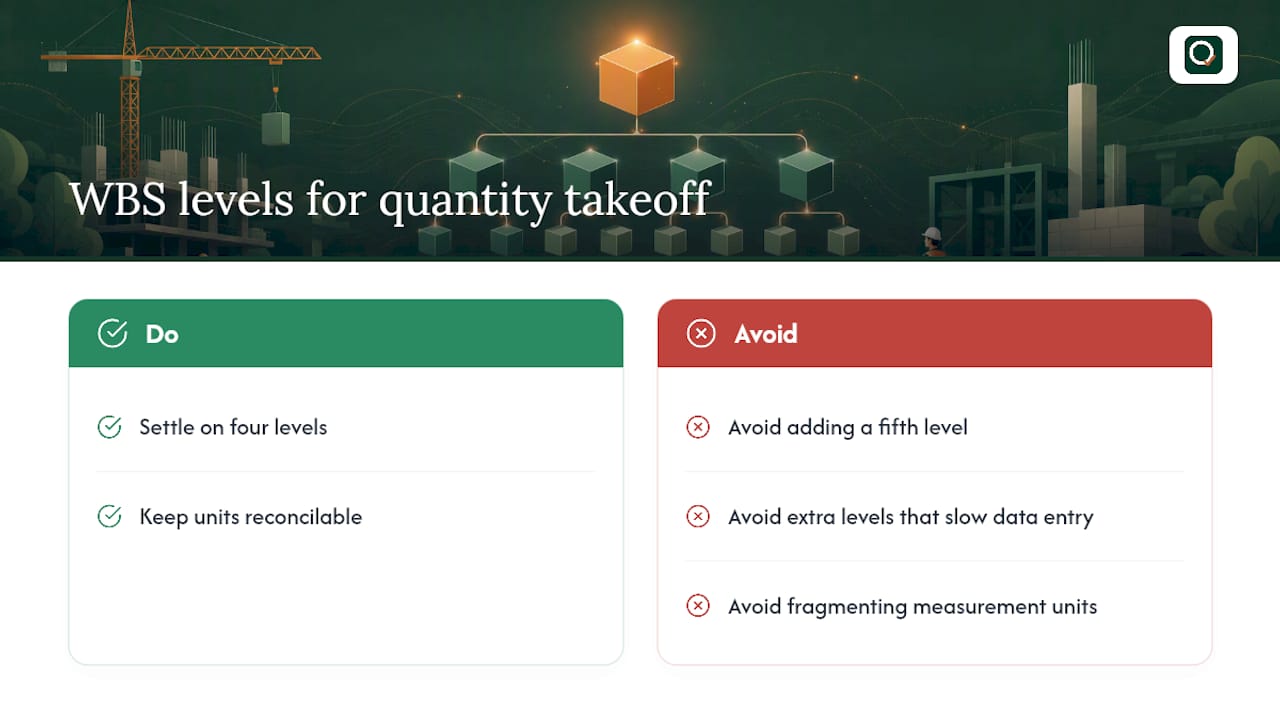
Most construction WBS structures settle on four levels, and there is good reason not to add a fifth. Extra levels slow down data entry without improving traceability, and they tend to fragment measurement units across too many rows to reconcile sensibly.
The standard hierarchy
Level 1: Project or contract package. The whole job, or the whole subcontract if you are measuring for a package tender.
Level 2: Major deliverable. Substructure, superstructure, envelope, internal finishes, external works. This is the level that usually aligns with how you split invoicing or manage major subcontracts.
Level 3: Scope group. Within superstructure, this might be frame, floors, roof. Within finishes, it might be flooring, wall finishes, ceilings.
Level 4: Work package. The measurable unit. This is where quantities actually get taken off, and it must carry a single unit of measure, not a mix.
A worked example: substructure and superstructure
For a substructure item, the tree might run: 1.0 Project → 1.2 Substructure → 1.2.3 Foundations → 1.2.3.4 Strip footings—Grade 30 concrete. At the work package level you capture the measurement basis (net volume poured, formwork area to vertical faces, excavation volume to design profile), the unit (m³ for concrete, m² for formwork), and the acceptance criteria (cured to design strength before backfill).
For a superstructure item: 1.0 Project → 1.4 Superstructure → 1.4.2 Suspended floors → 1.4.2.5 Concrete—First floor slab—Pour 1. Capture net area for finishes allowance, gross volume for concrete, and formwork area separately, because mixing these into one line is one of the most common sources of pricing error at tender stage.
Walls follow the same logic but need an extra scope decision recorded early: are you measuring gross wall area and deducting openings, or measuring net area directly? Either is defensible. What is not defensible is switching methods halfway through a project without noting it in the WBS dictionary.

A practical WBS format with a dictionary and explicit mapping columns reduces exactly this kind of scope gap, because every assumption sits next to the code it belongs to rather than in someone's memory.
Here is the column structure that works for most QTO teams:
| Column | Purpose |
|---|---|
| WBS code | Stable identifier, never reused or renumbered |
| Name (noun-based) | Deliverable description, e.g. "Finishes—Flooring—Tile" |
| Unit | m², m³, rmt, each, kg |
| Measurement basis | Gross/net, deductions applied, rounding rule |
| Scope boundary | What is included and excluded at this line |
| Responsible party | Who owns the measurement (QS, BIM modeller, subcontractor) |
| Acceptance criteria | What confirms the work package is complete or verified |
Fill this table out for every Level 4 item before you start measuring, not after. Trying to retrofit scope boundaries onto quantities you have already taken off is where most rework comes from.
Mapping WBS work packages to BOQ lines and cost codes
The mapping chain is simple in principle: work package → measurement unit → BOQ description → cost code. In practice, the failure point is almost always at the second step, where a team picks the wrong unit for how the trade actually prices the work.
For walls, the mapping runs from the WBS work package (say, "Masonry—Blockwork—100mm partition") to a measurement in m², to a bill of quantities line reading "100mm blockwork partition, including mortar joints, m²", to a cost code that your accounts team already recognises. Slabs follow the same pattern but split into two BOQ lines from one work package, since concrete volume and formwork area price differently and need separate rates.
Door schedules behave differently again. The WBS work package might be "Joinery—Internal doors—Type A", but the measurement basis is "each", not an area, and the BOQ line needs to reference the door schedule number directly so pricing and delivery both point at the same source document.
- Walls: work package → m² net of openings → BOQ description with mortar/joint allowance → masonry cost code.
- Slabs: work package → m³ concrete plus separate m² formwork → two BOQ lines → concrete and formwork cost codes.
- Doors: work package → each, keyed to schedule reference → BOQ line with door type → joinery cost code.
Pro Tip: Record waste factors and unresolved scope directly in the WBS dictionary entry, not in a separate notes file. When a rate gets challenged at tender, the assumption needs to be sitting right next to the quantity it affects, or nobody will find it in time.
What is the step-by-step workflow from drawings to priced takeoff?
A WBS-driven takeoff runs through six stages, and skipping the review gates between them is where most quantity disputes originate.
- Drawing register. Confirm you are measuring the current revision, and log the drawing numbers and dates against the WBS you are about to build.
- Draft WBS. Build the Level 1 to 4 structure before detailed measurement starts, marking any open scope decisions in the dictionary rather than waiting for a complete drawing set.
- Item catalogue or model mapping. Link WBS codes to a measurement item catalogue, or to BIM model elements if you are working from Revit or Navisworks.
- First-pass measurement. Take off quantities against each Level 4 work package, using the measurement basis already agreed in the dictionary.
- Validation. Cross-check quantities against subcontractor returns or a second measurer, flagging any variance for review.
- Export and handover. Push the finished takeoff to Excel or a BOQ format and hand it to pricing with the WBS codes intact.
Review gates matter more than the stages themselves. Insert a formal check after the draft WBS is issued, so the PM and lead estimator agree scope boundaries before anyone measures a single line. Insert a second gate after first-pass measurement, where any RFI raised against an unclear drawing gets logged against the specific WBS code it affects rather than as a general query. Version control should live at the WBS level too: each revision gets a new dictionary note, never a renumbered code.
Ownership should be explicit from the outset. The estimator typically owns first-pass measurement and validation. A BIM modeller, where one is involved, owns the model-to-WBS mapping and flags any elements the model does not capture cleanly. The project manager owns the review gates and signs off the export. Keep marked-up drawings, measurement logs and, where relevant, site photos against each work package. That evidence is what turns a takeoff into something you can defend six months later when a variance query lands on your desk, and it is the difference the role of drawings in quantity measurement actually turns on.
Which tools support a WBS-driven takeoff?
Tool choice sits on a spectrum from fully manual to fully model-driven, and most QS teams use more than one depending on the package.
Microsoft Excel remains the backbone for smaller projects and for final export, whatever software did the measuring. It accepts manual input freely, exports natively to BOQ formats, and gives you full control over formulas linking quantities to cost codes. The trade-off is that Excel enforces no structure of its own. Your WBS discipline has to come from you.
Autodesk Revit lets you extract quantities directly from a 3D model, which removes a large chunk of manual measurement error for buildings that are fully modelled. Quantities link to model elements rather than drawing takeoffs, so a design change updates the quantity automatically.
Autodesk Navisworks handles quantification across federated models from multiple disciplines. Navisworks workflows typically build an item catalogue that mirrors the WBS hierarchy, attach quantities to the lowest-level tasks, and export the finished workbook to Excel for reconciliation, which keeps the model-driven and spreadsheet worlds connected rather than separate.
AI-assisted extraction tools, including QuantiFlow, sit between manual and model-driven. They read PDF drawings directly, which matters because a large share of UK projects never reach a fully coordinated BIM model, and produce a first-pass structured takeoff an estimator then reviews.
| Tool category | Input types | Automation level | Export formats |
|---|---|---|---|
| Excel spreadsheets | Manual entry, CSV | Manual | Excel, CSV, PDF |
| Autodesk Revit | BIM model | Model-driven | Excel, schedules, PDF |
| Autodesk Navisworks | Federated BIM models | Model-driven, item catalogue | Excel (XLSX), reports |
| AI-assisted (e.g. QuantiFlow) | PDF, drawings | Assisted, human-reviewed | Excel, BoQ, PDF |
Whichever tool sits at the centre of your workflow, the WBS is what keeps outputs from different sources talking to each other. A quantity surveying software choice matters less than whether it can carry your WBS codes through to export, as covered in more detail in this guide to quantity surveying software benefits.
Common mistakes that break WBS traceability
Good governance around a WBS is mostly about discipline, not complexity. A short checklist covers most of it: keep version control at the code level, maintain a live WBS dictionary, assign a responsibility matrix so everyone knows who can measure or change a given package, and lock acceptance criteria before pricing starts.
The mistakes that break this discipline are depressingly repetitive across projects:
- Mixing project phases with deliverables in the same level, so "Phase 2" and "Roofing" both appear as Level 2 items.
- Using verb-based names like "Install flooring" instead of noun-based names, which makes searching and mapping unreliable.
- Letting units drift between similar work packages, so one slab is measured in m³ and another in m² with no note explaining why.
- Drafting the WBS after measurement has already started, which guarantees retrofitted scope boundaries and missed items.
- Never mapping the finished WBS back to BOQ lines or cost codes, leaving quantities orphaned from pricing.
Missing scope boundaries on a work package is the other big red flag: if nobody can say where one package ends and the next begins, that item needs re-drafting before it goes anywhere near a tender. Good construction measurement quality control depends on catching these at the WBS stage, not after quantities are already priced.
Pro Tip: Lock code numbering the day you issue the draft WBS. If scope changes later, add a revision note and a new work package rather than renumbering, or your audit trail becomes unreadable within a fortnight.
A reusable WBS template you can copy today
A compact template speeds up drafting more than any other single change to your process. Populate these seven columns for every Level 4 item before measurement begins, and resist the urge to add extra columns until you have used this version on at least one full project.
Naming stays noun-based throughout: "Concrete—Grade slab—Pour 1" rather than "Pour the ground floor slab", because a noun-based name searches and sorts cleanly across hundreds of rows in a way a verb-based sentence never will. Once a code is issued, it does not change. If scope shifts, add a revision entry to the dictionary note rather than renumbering, because a renumbered code breaks every historical link back to earlier valuations and progress reports.
Where does human-in-the-loop AI fit into a WBS takeoff?
AI-assisted extraction works best as a first-pass tool an estimator reviews, not a replacement for professional judgement. The workflow runs: automated extraction from the drawing, attachment to the relevant WBS code, then human validation with any correction clearly labelled as an override. This estimator-controlled structure is exactly what a comparative human-in-the-loop framework recommends over either pure manual takeoff or unchecked automation.

The errors worth watching for are consistent across tools: misclassification of an element type, missed dimensions on poorly scanned drawings, and scale errors where a drawing's stated scale does not match its actual print size. NER-based extraction research shows automated tools can reliably pull cost parameters like material and unit from text descriptions, but drawing quality still governs how much an estimator needs to correct.
Before accepting AI-suggested quantities into the master WBS, run three checks:
- Confirm the suggested unit matches the measurement basis already recorded in the dictionary.
- Spot-check dimensions against the drawing at the actual print scale, not the screen zoom level.
- Flag any element the tool could not classify, rather than letting it default silently to zero.
Pro Tip: Never let an AI-suggested quantity overwrite a work package without a visible override flag. If a client's QS ever asks why a figure changed, you need to show exactly who accepted it and why.
How I keep a takeoff defensible from day one
Draft the WBS before the drawing set feels finished, not after. Every project has open decisions on day one, so mark them in the dictionary and move on rather than waiting for certainty that rarely arrives on schedule. That habit alone has saved more reconciliation headaches than any measurement technique.
Because the WBS dictionary recorded our measurement basis (net of openings, specific waste factor noted), the discrepancy traced to their gross measurement method within the hour, not after a week of arguing.
How QuantiFlow supports a WBS-driven takeoff
Building the WBS structure is the easy part. Keeping it accurate when drawings run to 40 pages and revisions land weekly is where most teams lose hours. QuantiFlow reads PDF architectural drawings directly and produces a structured, NRM2-aligned takeoff that carries your WBS codes through from first measurement to final BoQ, so the traceability you have just built into your template survives contact with a real project.
QuantiFlow tags extracted quantities against your WBS work packages automatically, logs every audit and revision so nothing gets renumbered by accident, and lets you override any AI-suggested measurement at the line level, exactly the human-in-the-loop discipline this guide has argued for throughout. Output exports straight to Excel or PDF, ready to hand to pricing without reformatting.
If your team is still rebuilding the same WBS structure from scratch on every job, it is worth seeing how much of that drafting can be automated without losing the professional judgement a proper takeoff depends on. Visit the QuantiFlow landing page to start a trial and run your next takeoff through it.
Frequently asked questions
What is a WBS for quantity takeoff, exactly?
It is a hierarchical breakdown of project deliverables, usually three to four levels deep, where the lowest level is a measurable work package with its own unit of measure, scope boundary and acceptance criteria, built specifically to support accurate quantity measurement rather than just scheduling.
How many levels should a construction WBS have?
Three to four levels covers most building projects. Level 1 is the project, Level 2 is major deliverables such as substructure or finishes, Level 3 groups related scope, and Level 4 is the measurable work package where takeoff quantities actually get recorded.
How does WBS quantity analysis differ from a standard project WBS?
A standard project WBS often groups work by phase or activity for scheduling. A WBS built for quantity analysis groups work by deliverable and measurement unit instead, so every Level 4 item can be priced and audited independently rather than only tracked for progress.
Can I build a WBS in Excel, or do I need BIM software?
Excel works fine for smaller or less-modelled projects, provided you enforce the WBS discipline yourself. Autodesk Revit and Autodesk Navisworks add value when a coordinated model already exists, since quantities update automatically as the design changes.
Where does AI fit into WBS-based quantity takeoff?
AI tools like QuantiFlow handle first-pass extraction from PDF drawings, tagging quantities to your WBS codes automatically. An estimator still validates every figure before it enters the master takeoff, which keeps the process auditable and preserves professional judgement.
Sources
- Work breakdown structure - Wikipedia
- Comparative analysis of manual, BIM-based, and AI-assisted quantity takeoff (illustrative human-in-the-loop framework)
- Construction takeoff: a guide (Procore library)