
For UK SME quantity surveyors, builders, and architects working on Mac, Quantiflow is the recommended takeoff solution. It runs entirely in the browser, requires no Windows emulation, and produces NRM2-structured Bills of Quantities directly from PDF drawings. The quantity surveying software benefits for Mac users are immediate: no compatibility workarounds, no emulation lag, just measured, priceable output.
TL;DR
- Exports NRM2-structured BoQs to Excel and PDF
- Fully cloud-based, runs on any modern Mac browser
- Integrates a live UK rate library for direct pricing
- Logs every measurement with a full audit trail and QS override points
Start a free trial at quantiflow.co.uk with a sample PDF drawing and an NRM2 template to hand.
Table of Contents
- What should you check before choosing Mac takeoff software?
- How does Quantiflow meet each of those requirements?
- How does a Quantiflow takeoff actually work, step by step?
- What does Quantiflow cost, and which plan suits an SME?
- What Mac specs do you actually need for cloud-based takeoff?
- What does onboarding look like for a UK practice?
- Quantiflow: the Mac-friendly NRM2 takeoff built for UK SMEs
- Key takeaways
- Why a Mac-first workflow matters for UK quantity surveyors
What should you check before choosing Mac takeoff software?
The wrong tool costs more than its subscription fee. A platform that forces Windows emulation, exports to a proprietary format, or lacks NRM2 mapping will create rework on every project. Use this checklist before committing.
Essential capabilities
- NRM2-structured BoQ export (not just a flat spreadsheet)
- Calibrated 2D measurement: length, area, volume, and count
- PDF import with per-sheet calibration and multi-drawing support
- Professional-judgement override at key review stages
- Full audit trail and version control for every revision
Mac-specific checks
- Native macOS app or a fully supported web client with no Windows emulation required
- Confirmed performance on Apple silicon (M1/M2/M3) and Intel Macs
- Compatibility with macOS 12 Monterey or later
- No requirement to install a Windows virtual machine
UK market checks
- UK or EU data residency (GDPR-compliant hosting)
- Live UK rate library or ability to import NRM2 rate sets
- Support available during UK working hours
Questions to ask at demos
- Can you export a sample NRM2 BoQ from a real drawing today?
- What export formats are supported (Excel, PDF, CSV, API)?
- How are user seats and role permissions managed?
- What is the typical onboarding time for a two-person QS practice?
Red flags to walk away from
- No NRM2 export, only generic spreadsheet output
- Proprietary closed formats with no Excel or CSV option
- Windows-only desktop client with no credible Mac alternative
- Vague or absent audit logs
Pro Tip: Ask the vendor to run a live demo on a Mac during your evaluation call. If they switch to a Windows machine or a screen recording, that tells you everything about their Mac support.
How does Quantiflow meet each of those requirements?
Quantiflow maps directly to every item on that checklist. The platform is cloud-based, so it runs in Safari, Chrome, or Firefox on any Mac without emulation. AI extracts and cross-references quantities from uploaded PDF drawings, then maps them to NRM2 work sections. The QS reviews every extracted item, applies professional judgement, and overrides any figure before the BoQ is finalised.
| Requirement | Quantiflow feature |
|---|---|
| NRM2-structured BoQ export | Automated NRM2 mapping with QS sign-off at each stage |
| PDF import and calibration | Multi-sheet PDF upload with per-page scale calibration |
| UK rate library | Live UK rate library integrated for direct pricing |
| Audit trail | Full revision log with timestamps and override records |
| Professional-judgement override | Review checkpoints at extraction, mapping, and export |
| Collaboration and roles | Multi-user access with role-based permissions |
| Excel and PDF export | Structured BoQ exported to Excel and PDF |
| Mac compatibility | Browser-based; no installation, no emulation |
AI-assisted automated quantity takeoffs can reduce takeoff time significantly on repeatable items, though professional review checkpoints remain essential to preserve QS judgement. Quantiflow builds those checkpoints into the workflow by design, not as an afterthought.
For types of construction cost estimates where NRM2 compliance is contractually required, having an auditable, QS-signed BoQ is not optional. Quantiflow's audit trail satisfies that requirement out of the box.
How does a Quantiflow takeoff actually work, step by step?
The workflow is linear and auditable. Each step produces a traceable output.
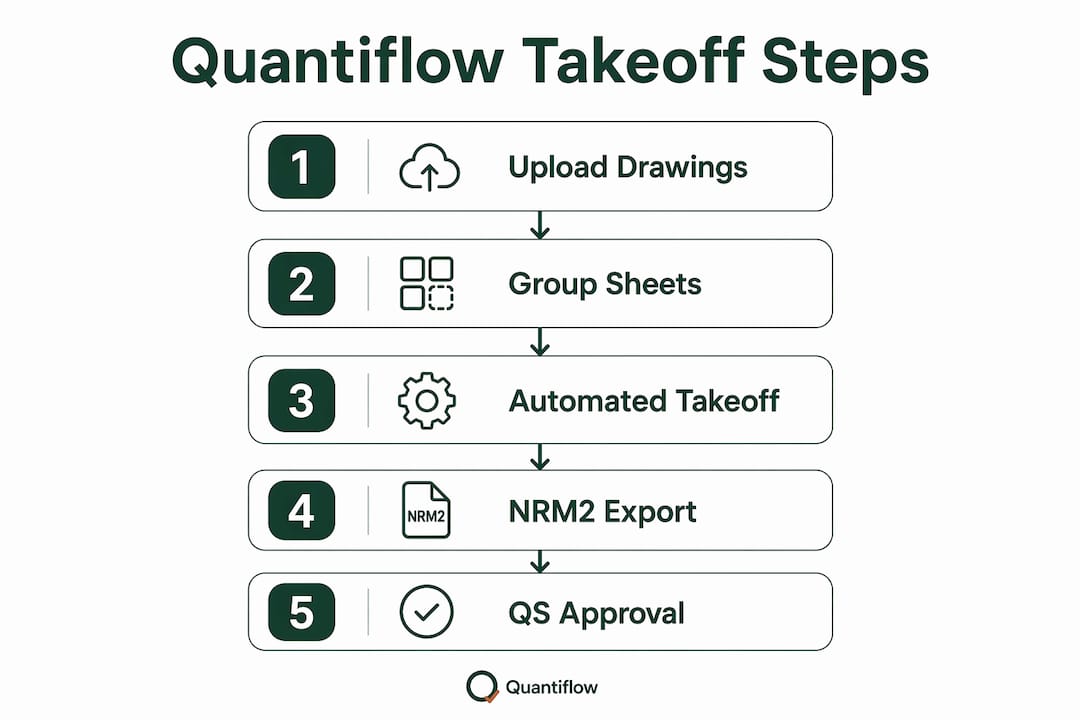
- Import PDFs. Upload architectural drawings directly. Quantiflow accepts multi-sheet PDFs and organises them by drawing number.
- Calibrate scale. Set the scale per page using a known dimension. For residential projects, setting out quantities from a 1:50 floor plan takes under two minutes.
- Run AI extraction. The cross-referencing engine reads the drawings and extracts quantities: lengths, areas, volumes, and counts. Items are grouped by element type.
- Review and override. The QS reviews every extracted item. Any figure can be amended or overridden, and the reason is logged. This is where professional judgement is applied.
- Map to NRM2 codes. Items are mapped to the relevant NRM2 work sections. Custom classification systems can be applied for non-standard projects, similar to how flexible classification rollups work in BIM-integrated platforms.
- Export BoQ. The finalised BoQ exports to Excel or PDF in NRM2 structure, ready for pricing against the live UK rate library or for issue to a contractor.
Pro Tip: Group drawing sheets by building element (substructure, superstructure, finishes) before uploading. This reduces the manual sorting step and keeps NRM2 mapping consistent across the project.
Where drawings include external works, Quantiflow handles external works quantities from site plans using the same calibration and extraction workflow.

What does Quantiflow cost, and which plan suits an SME?
Quantiflow publishes three tiers. There is no long-term contract required to start.
| Plan | Monthly price | Best for | Core features |
|---|---|---|---|
| Solo | £39/month | Single QS or sole trader | Full takeoff, NRM2 export, UK rate library, audit trail |
| Business | £149/month | Small teams (2–5 users) | All Solo features plus multi-user roles, collaboration, priority support |
| Enterprise | Custom | Larger practices | Custom seats, API access, dedicated onboarding, SLA |
For a solo QS billing at typical UK rates, the Solo plan pays for itself on a single small residential takeoff. The Business plan suits a two-to-five person practice where multiple team members need concurrent access and role-based permissions.
AI-assisted automation can reduce takeoff time significantly on repeatable items. For a small residential project that previously took a full day to measure manually, that translates to a meaningful reduction in non-billable hours each month.
Trial checklist. Before starting a free trial, prepare: a sample PDF drawing set (at least one floor plan and one elevation), an NRM2 template or work breakdown you normally use, and a list of the user seats you need. Run the full PDF-to-BoQ workflow on a real project during the trial, not a demo drawing, to validate the output against your own NRM2 standard.
What Mac specs do you actually need for cloud-based takeoff?
Cloud-based takeoff software changes the hardware conversation. Because processing happens server-side, the Mac's CPU and RAM matter far less than they would for a native desktop application.
Minimum requirements for Quantiflow on Mac
- macOS 12 Monterey or later (macOS 14 Sonoma recommended)
- Any Apple silicon Mac (M1 or later) or Intel Mac from 2018 onwards
- 8 GB RAM for comfortable multi-sheet PDF handling
- A stable broadband connection (10 Mbps or above for large drawing sets)
- Safari 16+, Chrome 110+, or Firefox 110+
Apple silicon Macs handle browser-based workflows with noticeably lower fan activity and better battery life than equivalent Intel machines, which matters for site visits and client meetings. A Mac-native takeoff app removes emulation friction entirely, and cloud clients achieve a similar result by keeping all heavy computation off the device.
For offline scenarios, Quantiflow's cloud model does require an internet connection. If you regularly work on sites with poor connectivity, download drawing sets in advance and plan measurement sessions for when you are back on a reliable network.
What does onboarding look like for a UK practice?
Most SME practices are fully operational within one to two weeks. The typical path runs: free trial with a real project → pilot BoQ reviewed against your existing NRM2 output → team rollout with role assignments → audit of first live BoQ before issue.
| Milestone | Typical timeline | What to prepare |
|---|---|---|
| Trial and first BoQ | Days 1–3 | Sample PDF drawings, NRM2 template |
| Pilot review | Days 4–5 | Compare Quantiflow output to a manually produced BoQ |
| Team rollout | Week 2 | User seat list, role assignments, drawing filing structure |
| First live BoQ audit | Week 3–4 | QS sign-off checklist, client issue format |
Integrations to prioritise. Quantiflow exports to Excel and PDF, which connects directly to most UK estimating workflows. For practices using project management platforms, the structured Excel export maps cleanly to cost-plan templates. Connecting site data from tools such as construction scheduling software or mobile timekeeping platforms rounds out the preconstruction-to-delivery data chain.
Support is available during UK working hours, with account onboarding included on Business and Enterprise plans. Documentation covers Mac-specific browser setup, PDF preparation, and NRM2 mapping guides.
Pro Tip: Run your pilot on a completed project where you already have a signed-off BoQ. Comparing Quantiflow's output to a known result is the fastest way to calibrate your confidence in the platform before using it on a live tender.
Quantiflow: the Mac-friendly NRM2 takeoff built for UK SMEs
Spending hours on manual measurement when a PDF drawing is sitting on your desktop is a solvable problem. Quantiflow turns that PDF into a priced, NRM2-structured BoQ in a fraction of the time, with every measurement logged and every override recorded.
For UK quantity surveyors, builders, and architects who work on Mac, Quantiflow removes the compatibility friction entirely. No Windows emulation, no proprietary lock-in, no separate rate database to maintain. The Solo plan starts at £39/month; the Business plan at £149/month covers small teams. Both include the full NRM2 export workflow, live UK rate library, and audit trail.
To get started, visit quantiflow.co.uk, upload a sample drawing, and run a complete PDF-to-BoQ workflow during your free trial. If you want a guided walkthrough first, book a demo and have a drawing set and your standard NRM2 template ready.
Key takeaways
Quantiflow is the recommended Mac-compatible, NRM2-aligned takeoff solution for UK SME quantity surveyors, builders, and architects, running in any Mac browser with no emulation required.
| Point | Details |
|---|---|
| Mac compatibility | Quantiflow is fully cloud-based and runs in Safari or Chrome on any Mac without Windows emulation. |
| NRM2 export | The platform maps extracted quantities to NRM2 work sections and exports structured BoQs to Excel and PDF. |
| Pricing for SMEs | Solo plan at £39/month suits individual QS; Business plan at £149/month covers small teams with multi-user roles. |
| Professional judgement | QS review and override checkpoints are built into every stage, with a full audit trail for every revision. |
| Quantiflow recommendation | Start a free trial at quantiflow.co.uk with a real PDF drawing to validate NRM2 output before committing. |
Why a Mac-first workflow matters for UK quantity surveyors
The conventional wisdom in construction software has long been that Mac users must compromise: accept a web app that barely works, or run Windows in a virtual machine and absorb the performance hit. That framing is outdated, and it has quietly cost UK QS practices real time.
The more important point is this: the best Mac takeoff software is not the one with the most features. It is the one that preserves your professional judgement while removing the mechanical drudgery of manual measurement. AI extraction is only as good as the QS reviewing it. A platform that automates without checkpoints is a liability, not an asset. Quantiflow's design philosophy, building override and sign-off into every stage, reflects how AI and QS professional judgement should actually work together.
For SMEs, the Mac compatibility question is also a procurement question. Choosing a platform that runs natively on the hardware your team already uses, without emulation, without IT overhead, is a decision that pays back on day one.