
Capture these four data points on every takeoff or BoQ action and enforce automated versioning: do that, and your project stays auditable from first measurement to final account.
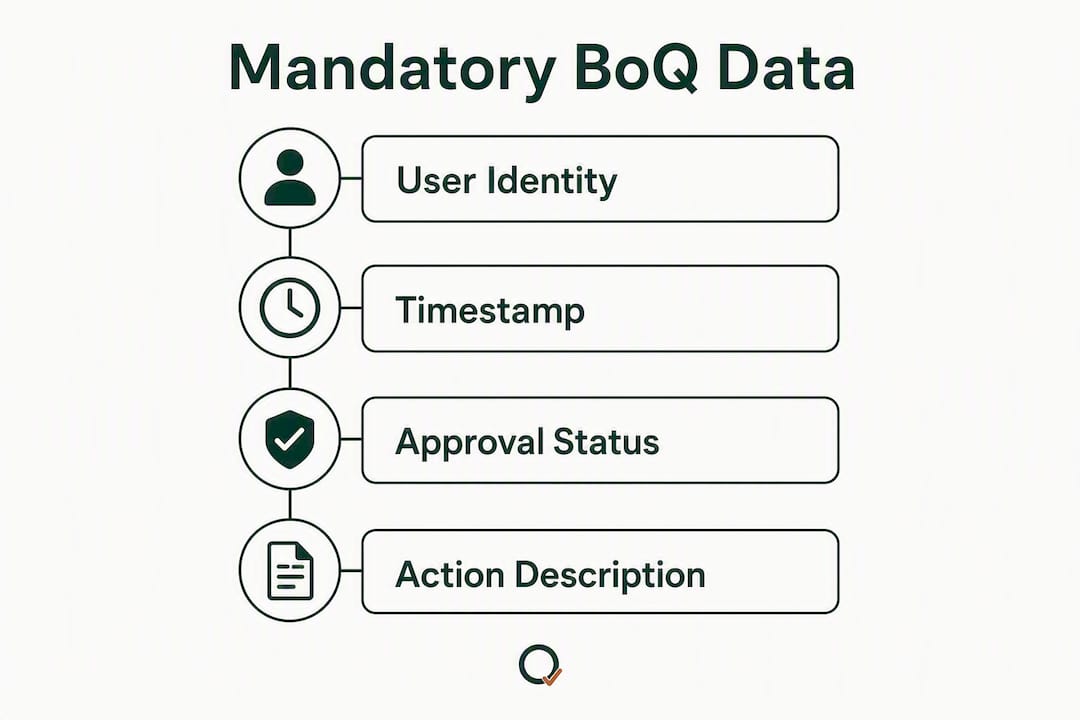
The four mandatory fields for every logged action:
- User identity — who made the change (named individual, not a shared login)
- Exact timestamp — date and time to the minute, not just the date
- Nature of the revision — what changed, which element, and by how much
- Approval/status — whether the entry is draft, under review, or approved
Do this now — paste into your project brief:
- Confirm all team members have individual named logins before takeoff begins
- Set automated versioning so every drawing revision creates a new, superseding BoQ version
- Enable notification triggers so reviewers receive an alert within one working day of any change
- Agree approval-status values (Draft / Under Review / Approved) and enforce them from day one
Table of Contents
- Why robust audit logs protect margin and reduce dispute risk on UK projects
- What are the four mandatory data points every BoQ action must record?
- How do version control and notifications stop wrong-revision working?
- What governance model keeps audit entries trustworthy and repeatable?
- Step-by-step audit-ready takeoff and BoQ workflow
- What should you export for adjudication and final accounts?
- Copyable audit-log checklist for project teams
- How does Quantiflow map to these audit-log best practices?
- Common implementation mistakes and red flags in your audit logs
- Key takeaways
- Why audit-ready records matter more than most QSs realise
- Quantiflow gives you audit-ready takeoffs from day one
- Useful sources and further reading
Why robust audit logs protect margin and reduce dispute risk on UK projects
A weak audit trail does not just create administrative inconvenience. It can cost you money you have legitimately earned. RICS-aligned guidance treats cost auditing as a cyclical process and stresses real-time evidence capture to simplify final account settlement. When records are built contemporaneously, unsubstantiated costs do not accumulate and the burden of proof at final account is manageable.
Under NEC, JCT, and FIDIC contracts, the burden of proof for compensation events, variations, and prolongation claims rests with the party asserting the entitlement. Without a contemporaneous, linked audit trail from instruction to cost to payment, legitimate costs can be disallowed and disputes become expensive. The record is not a back-office formality; it is your commercial evidence.
Pro Tip: When a verbal or informal instruction arrives, raise a formal contract notice the same day. Log the instruction reference, the contract clause, and the deadline for the employer's response in your audit log. Missing a NEC compensation event window is an entitlement loss that no retrospective record can recover.
What are the four mandatory data points every BoQ action must record?
Every logged action in a takeoff or BoQ workflow needs a minimum of four fields to be defensible at adjudication. These are not optional enhancements; they are the floor.
| Field | Why it matters | Example entry |
|---|---|---|
| User identity | Establishes individual accountability; prevents disputed authorship | J. Patel (QS, Firm A) |
| Exact timestamp | Proves contemporaneous capture; ties to contract notice windows | 14 March 2026 |
| Nature of revision | Defines what changed, which element, and the quantum | Block B external wall: +12.4 m² (Rev C drawing) |
| Approval/status | Shows whether the entry is live or still under review | Approved — R. Singh, 15 March 2026 |
Missing any one of these fields weakens the entry. A timestamp without a named user cannot prove who acted. An approval without a nature-of-revision note cannot be reconciled at final account. All four fields together create a self-contained evidential unit that stands up without supplementary explanation.
How do version control and notifications stop wrong-revision working?
Automated version control that supersedes earlier revisions is not a nice feature; it is a mandatory control. Teams working from superseded drawings produce quantities that cannot be reconciled to the issued tender or contract BoQ, and the cost of correcting that at final account is significant.
The practical pattern to enforce:
- Trigger event — a new drawing revision is uploaded or issued
- Automatic version creation — the platform creates a new, dated BoQ version and locks the previous one
- Notification — named reviewers receive an alert with the revision reference and a link to the new version
- Review window — a defined period (typically 24–48 hours) during which the QS confirms the revision scope
- Publish — the approved version becomes the live working document; the superseded version is archived but accessible
Industry guidance on revision control confirms that automated revision control and notification minimise wrong-revision working and lost notice windows. Document control best practice adds that naming conventions, latest-approved tracking, and access rules are all necessary to maintain a single source of truth rather than fragmented files across shared drives and messaging apps.
Pro Tip: Keep revision codes and status codes strictly separate. A revision code (Rev A, Rev B, Rev C) identifies the iteration of a document. A status code (S2 Suitable for Construction, S4 Superseded) tells the team whether they may build from it. Conflating the two is one of the most common causes of wrong-version working on UK projects.

What governance model keeps audit entries trustworthy and repeatable?
Defined roles and simple approval states reduce ambiguity and prevent unauthorised edits. Without them, audit entries reflect whoever happened to be logged in, not the person with the authority to make that change.
Recommended roles and permitted actions:
- Measurer — creates and edits takeoff entries; cannot approve
- Reviewer — checks entries against drawings; can flag for revision or pass to approver
- Approver — signs off entries as approved; cannot edit after approval without creating a new version
- Document controller — manages drawing register, revision status, and distribution records
Approval-status values: Draft → Under Review → Approved → Superseded. No entry should move from Draft to Approved without passing through Under Review.
Review cadence: daily for active takeoff phases; weekly during design development; triggered immediately by any new drawing revision.
Policy template — paste into your project governance document:
- Named logins mandatory; shared credentials prohibited
- All drawing revisions logged within one working day of receipt
- No BoQ entry approved without a linked drawing reference
- Approved entries locked; amendments require a new version with a change note
- Audit log exported at each payment application and at practical completion
Step-by-step audit-ready takeoff and BoQ workflow
Follow this workflow and every BoQ change will be traceable to source evidence, from the first PDF drawing to the final account submission.
- Import (Document Controller) — upload drawings; log revision reference, date received, and issuing party; confirm scale calibration
- Auto-takeoff (Measurer) — run AI-assisted measurement; log which drawing revision each element references; flag any scale anomaly
- Peer review (Reviewer) — check quantities against drawing dimensions; log discrepancies; escalate if variance exceeds agreed tolerance
- Approve (Approver) — confirm quantities and drawing references; set status to Approved; lock the entry
- Publish (Document Controller) — release the approved BoQ version; notify all stakeholders; archive the previous version
- Variations (QS/Measurer) — log each variation against the original approved entry, the instruction reference, and the revised quantity; set status to Under Review until approved
Variation tracking example:
- Original entry: Block B external wall, 112.4 m², Rev B drawing, Approved 10 March 2026
- Variation instruction: AI-2026-047, issued 18 March 2026
- Revised quantity: 124.8 m², Rev C drawing
- Change note: +12.4 m² due to revised window schedule; linked to instruction AI-2026-047
- Status: Approved 20 March 2026, R. Singh
Quality-control peer-review checkpoints should be built into steps 3 and 4. If a reviewer finds a systematic error, escalate immediately rather than correcting silently; the correction itself must be logged.
What should you export for adjudication and final accounts?
Export a versioned PDF evidence bundle and a reconciled Excel workbook that links every line to its source document. That combination gives an adjudicator or auditor a self-contained record without requiring access to your live platform.
Minimum export contents:
- Audit log excerpt covering the relevant period (all four mandatory fields visible)
- Signed approval records for each BoQ version
- Original drawing references and revision status at the time of measurement
- Transmittal records showing when drawings were issued and received
- Variation register linking each change to its instruction and approved quantity
- Payment certificates or application summaries tied to approved BoQ versions
| Export item | Format | Chain-of-custody note |
|---|---|---|
| Audit log excerpt | PDF (locked) | Include platform-generated timestamp on export |
| Approved BoQ versions | Excel + PDF | Version number and approval date in filename |
| Variation register | Excel | Each row links to instruction reference and drawing revision |
| Drawing transmittals | Issuing party, date, revision reference |
A final account workbook needs each adjustment stream to tie to a specific source document; dayworks sheets and supplier invoices are common evidential items that must appear as named attachments, not loose files.
Pro Tip: When you export a PDF bundle for adjudication, include a cover sheet that states the export date, the platform version, and the name of the person who generated the export. That single page establishes chain of custody and makes the bundle harder to challenge on procedural grounds.
Copyable audit-log checklist for project teams
Paste this into your project brief or handover pack on day one.
At import:
- Drawing revision reference logged (Document Controller)
- Scale calibration confirmed and recorded (Measurer)
- Drawing register updated (Document Controller)
At measurement:
- Each takeoff element references a specific drawing revision (Measurer)
- User identity confirmed via named login (Measurer)
- Timestamp auto-generated by platform (automatic)
At review:
- Peer review completed and discrepancies logged (Reviewer)
- Escalation raised if variance exceeds tolerance (Reviewer → Approver)
At approval:
- Approval recorded with named approver and date (Approver)
- Entry locked; previous version archived (Approver/Document Controller)
At closeout:
- Full audit log exported to PDF and Excel (Document Controller)
- Variation register reconciled to final account (QS)
- Export bundle filed with project records and shared with client if required (Document Controller)
How does Quantiflow map to these audit-log best practices?
Quantiflow supports NRM2-aligned takeoffs, multi-role collaboration, immutable audit logs, automated versioning, and PDF/Excel exports — the full set of controls this workflow requires.
| Practice | Quantiflow capability | Action to enable |
|---|---|---|
| Four mandatory data fields | Audit log captures user, timestamp, revision detail, and status automatically | Confirm all users have individual named accounts |
| Automated versioning | New drawing revision triggers a new BoQ version; previous version locked | Enable auto-version on drawing upload in project settings |
| Notification triggers | Named reviewers notified on version creation or status change | Set reviewer roles and notification preferences per project |
| Role-based permissions | Measurer, Reviewer, and Approver roles with distinct edit/approve rights | Assign roles during project setup |
| NRM2-aligned takeoffs | AI-assisted measurement structured to NRM2 work sections | Select NRM2 template at project creation |
| PDF/Excel export | Versioned export with audit log, approvals, and drawing references | Export from the Reports panel at each payment application |
First-week configuration checklist for a new Quantiflow project:
- Create individual named accounts for every team member
- Assign Measurer, Reviewer, and Approver roles before any drawing is uploaded
- Upload the drawing register and confirm revision references
- Select the NRM2 takeoff template
- Set notification rules for reviewers
- Run a test export to confirm the audit log fields are visible in the output
Quantiflow's AI quantity takeoff platform is built specifically for UK SME quantity surveyors, builders, and architects, converting PDF drawings into measured, priceable BoQ output while preserving the QS's professional judgement at every approval stage.
Common implementation mistakes and red flags in your audit logs
These seven red flags commonly undermine audit readiness on UK projects.
- Fragmented records — quantities in one spreadsheet, approvals in email, drawings in a shared drive. Remediation: consolidate into a single platform before takeoff begins.
- Missing timestamps — entries dated by day only, not time. Remediation: use a platform that auto-generates timestamps to the minute.
- Emails and WhatsApp as approvals — informal channels are not auditable approval records. Remediation: require all approvals to be logged in the platform with a named approver.
- Conflated revision and status codes — treating Rev C as equivalent to "approved for construction". Remediation: enforce separate revision and status fields from day one.
- Late notice handling — instructions logged after the contract deadline has passed. Remediation: log every instruction on the day it is received and set calendar alerts for response windows.
- Incomplete export metadata — exports with no version number, export date, or generating user. Remediation: add a cover sheet to every export bundle before filing.
- Unsigned dayworks sheets — dayworks records without a named authorising signature. Remediation: require a named approval in the platform before any dayworks entry is marked as approved.
The most common underlying mistake is waiting for an external audit to organise records. The audit trail is a revenue-recovery tool and must be built contemporaneously by the people closest to the event.
Key takeaways
Audit log best practices for UK quantity surveyors come down to one discipline: capture all four mandatory data fields on every action, enforce automated versioning, and export a complete evidence bundle at each payment milestone.
| Point | Details |
|---|---|
| Four mandatory fields | Every log entry must record user identity, exact timestamp, nature of revision, and approval status. |
| Automated versioning | New drawing revisions must trigger a new BoQ version automatically; manual version management creates gaps. |
| Governance and roles | Assign Measurer, Reviewer, and Approver roles before takeoff begins; shared logins invalidate the audit trail. |
| Export for adjudication | Export a versioned PDF bundle and reconciled Excel workbook at each payment application and at practical completion. |
| Quantiflow | Quantiflow automates NRM2-aligned takeoffs with built-in audit logs, role-based permissions, versioning, and PDF/Excel exports. |
Why audit-ready records matter more than most QSs realise
The conventional wisdom is that audit logs are a compliance requirement, something you set up once and revisit only when a dispute arises. That framing is wrong, and it costs practices money.
An audit trail built contemporaneously is a live commercial tool. Every approved entry is a piece of evidence you already hold. Every variation linked to a drawing revision and an instruction reference is a line in your final account that does not need to be reconstructed under pressure. The practices that feel like overhead during a busy takeoff phase are the ones that make the difference when a contractor disputes a quantity or an adjudicator asks for the evidential basis of a claim.
What most small practices underestimate is how quickly fragmented records accumulate. A single project with three drawing revisions, two variations, and one disputed dayworks sheet can generate dozens of disconnected files across email threads, shared drives, and messaging apps. By the time the final account is prepared, reconstructing the sequence of events is a significant piece of work in itself, and reconstruction is never as persuasive as a contemporaneous record.
The answer is not a more elaborate filing system. It is a workflow where capture is automatic, approval is named and timestamped, and export is a single action. That is the standard worth building to.
Quantiflow gives you audit-ready takeoffs from day one
Audit-ready BoQ production used to mean a separate document-control system on top of your measurement tool. Quantiflow removes that duplication. The platform captures the four mandatory audit fields automatically, locks approved entries, versions every drawing revision, and exports a complete evidence bundle in PDF and Excel — all within a single NRM2-aligned workflow built for UK SME practices.
Solo plans start at £39/month. Business plans, which include multi-role collaboration and full audit-log exports, start at £149/month. Enterprise pricing is available for larger teams. Every plan includes a free trial so you can test the audit log, versioning, and export features before committing.
Start your trial at quantiflow.co.uk and run your first NRM2-aligned takeoff with a complete audit trail from the first drawing upload.
Useful sources and further reading
- Cost auditing in infrastructure (RICS) — RICS-aligned perspective on real-time evidence capture and final account settlement; recommended reading before preparing any cost audit submission.
- Document control in construction — covers naming conventions, version control, access rules, and retention requirements for a CDE-aligned audit trail.
- How construction contracts use BoQ — explains NEC/JCT contract mechanics and evidential requirements relevant to notice windows and variation valuation.
- Construction measurement quality control — peer-review checkpoints and quality-control steps for audit-ready takeoff workflows.